
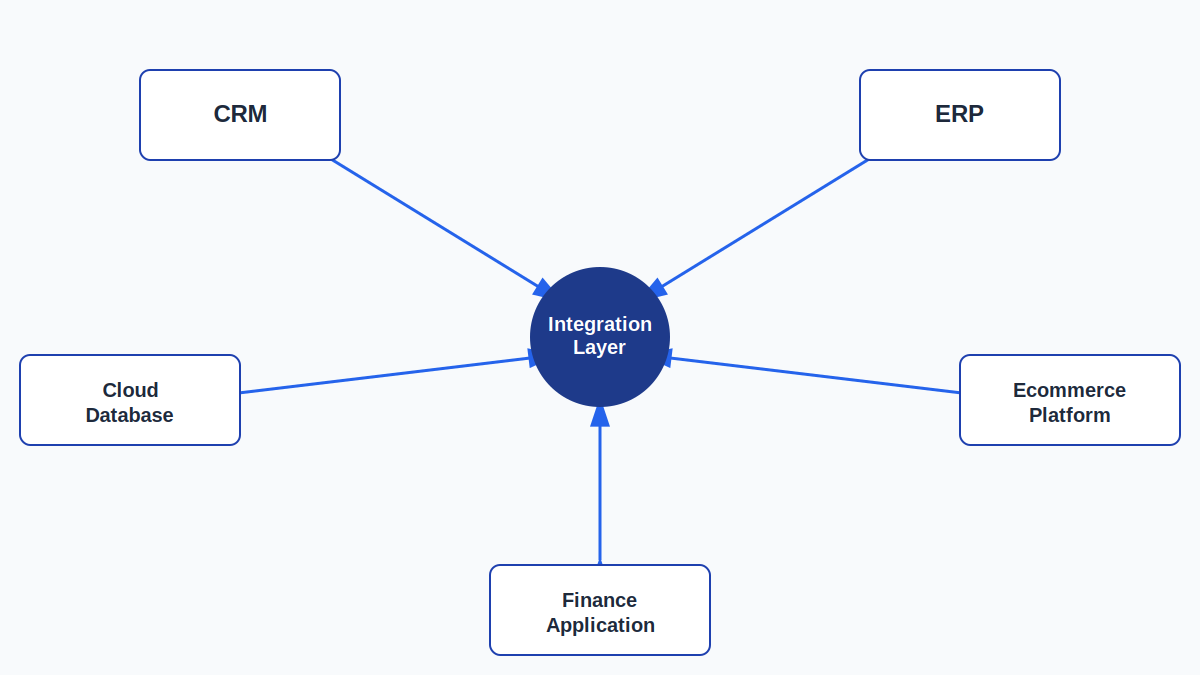
Most businesses run on more systems than they originally planned for. A CRM handles sales. An ERP handles operations and finance. Spreadsheets fill the gaps. A support platform, an ecommerce store, a BI tool, and a handful of SaaS subscriptions get added along the way, each one useful on its own, none of them built to talk to the others. The result is duplicate data entry, conflicting records, and reports that take hours to assemble by hand.
DataScienceConsultingPro.com designs and builds the integrations that connect these systems, so information created in one place is available where it’s needed, without manual re-entry or guesswork about which record is correct. This work is for operations leaders, IT managers, and business owners who are past the point of tolerating disconnected tools and need a technical partner to design and implement the connections. The outcome is straightforward: systems that share accurate information automatically, and teams that spend less time reconciling data and more time using it.
Discuss Your Data Integration Project
Data Integration Services for Connected Business Systems
Data integration services connect the applications, databases, and platforms a business already uses, so records created or updated in one system flow to the others that depend on them. This is different from replacing software or building a new data warehouse. It’s about making the systems already in place work together reliably.
The work typically involves connecting a CRM to a finance system, syncing an ERP with a reporting layer, linking an ecommerce platform to inventory and support tools, or building custom connections between internal applications and external partners. Some integrations run continuously in near real time; others run on a schedule that matches how the business operates. The right approach depends on the systems involved, the volume of data, and how quickly downstream teams need updated information.
What Are Data Integration Services?
Data integration connects separate systems so they can exchange information on an ongoing basis, instead of relying on someone manually exporting a spreadsheet from one tool and importing it into another. Once an integration is in place, updates made in a source system (a new customer record, an updated order status, a changed inventory count) are passed to the systems that need that information, following rules that define what should move, how it should be transformed, and how often.
This differs from a one-time data transfer. A properly built integration keeps working after the initial setup, adapting as data volumes grow and as new fields or business rules are introduced.
Signs Your Business Needs Data Integration
Fragmented systems tend to show up in the same handful of ways:
- Employees enter the same information into multiple systems. A new customer gets added to the CRM, then re-typed into the invoicing platform and the support tool, tripling the chance of a typo and the time spent on data entry.
- Customer records don’t match between systems. A customer’s CRM record shows one phone number while billing shows another, and no one is sure which is current.
- Reports require manually combining spreadsheets. A monthly report means pulling exports from three or four tools and reconciling them in Excel before anyone can trust the numbers.
- Sales and finance platforms disagree. Revenue figures in the CRM don’t match what finance reports, because neither system is the acknowledged source of truth.
- Teams repeatedly export and import CSV files. A recurring task exists purely to move data from one system to another by hand, on a schedule someone has to remember.
- Business applications can’t exchange data on their own. Two platforms that should logically connect have no supported way to share information, so a workaround has been improvised.
- Dashboards pull from incomplete or outdated sources. Leadership makes decisions from a dashboard that’s missing data from systems it was never connected to.
- A system change breaks manual processes. Every time a system is updated, someone has to manually re-check and re-build the exports and imports that depended on it.
- New SaaS tools have added silos instead of removing them. Each new subscription solves an immediate problem but adds one more disconnected data source to manage.
Each of these has a real cost, in staff time, in decision-making confidence, and in how quickly the business can respond to what’s actually happening.
Our Data Integration Services
API Integration Services
Most modern integrations run through APIs. This work includes connecting to REST APIs and other web services, handling authentication (API keys, OAuth, tokens), mapping fields between the source and destination systems, validating incoming and outgoing data, and building error handling so a failed call doesn’t silently drop a record. Where a platform doesn’t expose a public API, we evaluate available alternatives, including webhooks or supported partner connectors.
Database Integration Services
This covers connecting SQL and cloud databases directly to applications, reporting tools, and other databases. Examples include syncing an operational database with a reporting environment, or connecting a legacy database to a modern application that now needs access to the same records. The work includes managing schema differences, connection security, and keeping data consistent across the connected systems.
CRM Data Integration
CRM platforms such as Salesforce, HubSpot, and Zoho hold information that other teams need: finance needs invoicing data tied to the right account, support needs to see recent purchases, and marketing needs accurate lifecycle stages. We connect CRM data with sales, marketing, finance, customer support, and analytics systems so each team works from the same underlying records instead of a manually maintained copy.
ERP Data Integration
ERP systems typically hold inventory, finance, procurement, and operational data that other applications need in order to function correctly. We connect ERP platforms with the surrounding systems that depend on that information (reporting tools, ecommerce platforms, CRM systems, and warehouse or logistics applications) so operational data doesn’t have to be manually re-keyed elsewhere.
SaaS Application Integration
Cloud business applications rarely arrive with the ability to talk to every other tool a company uses. We connect SaaS platforms to each other and to internal systems, using native connectors where available and custom API work where they’re not, so a growing SaaS stack doesn’t turn into a growing set of disconnected silos.
Cloud Data Integration
This covers both cloud-to-cloud integration between hosted platforms and cloud-to-on-premise integration, where a cloud application needs to exchange data with systems still running in a local environment. The focus here is the data exchange itself (the connections, authentication, and synchronization logic) rather than broader cloud infrastructure design.
Multi-Source Data Integration
Some projects involve combining data from several structured and semi-structured sources at once (databases, APIs, flat files, and SaaS platforms) feeding into a single downstream system. This requires a mapping and transformation layer that can reconcile differences in format, structure, and update frequency across every source involved.
Automated Data Synchronization
Once systems are connected, synchronization needs to run without manual intervention. Depending on the use case, this may mean scheduled batch updates (hourly, daily, or otherwise), event-driven synchronization triggered by a specific action, or near-real-time updates for data that needs to stay current continuously. We build the synchronization rules to match how quickly the business actually needs the data, rather than defaulting to the fastest option regardless of need.
Legacy System Integration
Older systems are often central to daily operations but weren’t built with modern integration in mind. We connect legacy applications and databases to current tools using whatever access points are available (database-level connections, file-based exports, or middleware) so a legacy system doesn’t have to be replaced just to make its data usable elsewhere. This is a connection, not a replacement; see data migration services if the goal is to retire the legacy system entirely.
Custom Data Integration Solutions
Not every integration has an off-the-shelf connector. When platforms don’t offer pre-built integrations, or business rules are too specific for a generic tool, we build custom integration logic (often combining direct API work, middleware, and custom transformation code) to connect systems that wouldn’t otherwise work together.
A Practical Example: Connecting Ecommerce, CRM, and Finance Systems
The scenario: A growing ecommerce company runs Shopify for online sales, HubSpot for marketing and customer relationships, QuickBooks for accounting, a separate inventory and warehouse platform, a customer support tool, and Power BI for reporting.
Before integration: Order data lives in Shopify. Customer contact history lives in HubSpot. Financial records live in QuickBooks, updated by someone manually re-entering completed orders. Inventory counts are tracked separately, so the website occasionally shows items as in stock when they aren’t. Support agents can’t see recent order history without switching platforms. Power BI reports are built by exporting spreadsheets from each system and combining them manually, usually a day or two after the numbers were current.
The integration approach: Shopify orders sync automatically to QuickBooks as they’re placed, eliminating manual re-entry. Customer and order data flow into HubSpot so marketing and sales have current purchase history. Inventory counts sync between Shopify and the warehouse platform in near real time. Support tools pull recent order status directly from Shopify. Power BI connects to the underlying systems directly, rather than relying on manual exports.
After integration: Order and financial data stay consistent without manual re-entry. Support agents can see current order information without switching tools. Inventory discrepancies between the website and the warehouse are reduced because both systems reflect the same data. Reports are built from current data across systems rather than a manually assembled snapshot. (This is an illustrative scenario intended to show how the pieces fit together, not a guarantee of specific results for any project.)
Request a Data Integration Consultation
Our Data Integration Process
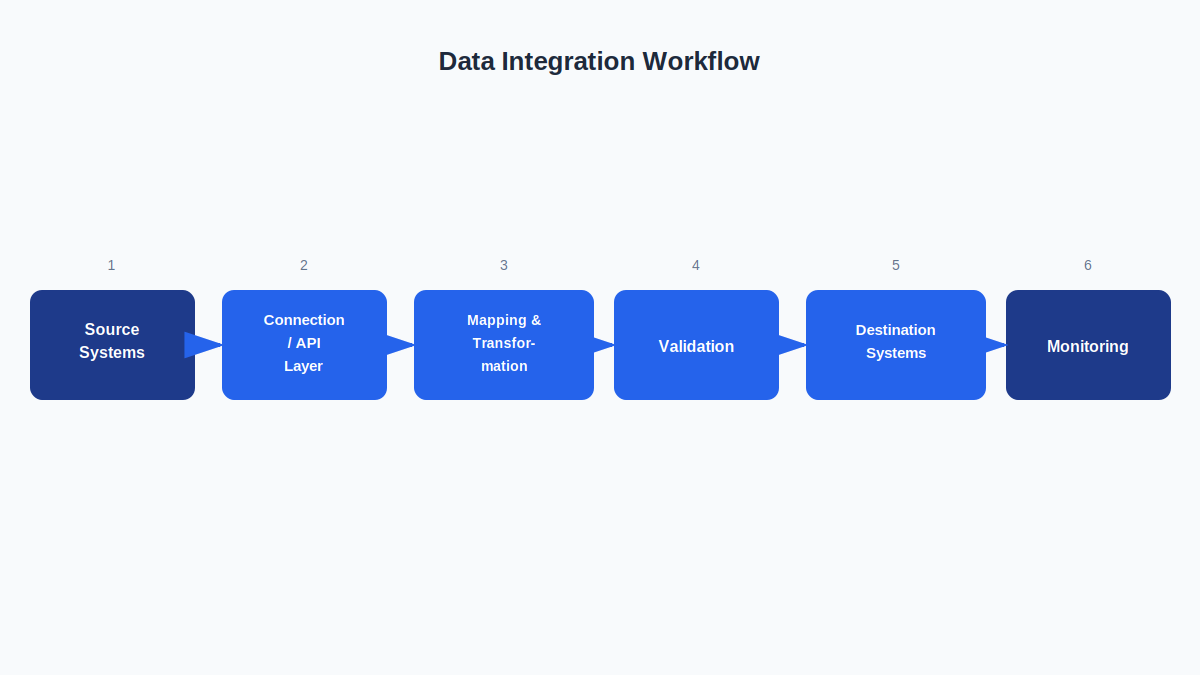
1. Discovery and Requirements Assessment We identify the systems involved, the business requirements driving the project, who owns each system, and what the integration needs to accomplish for the teams that depend on it.
2. Source and Destination Assessment We review the technical details of each system (databases, applications, APIs, data formats, and available connectivity options) to understand what’s realistically possible and what constraints exist.
3. Integration Architecture Design We determine how the systems should communicate: which integration pattern fits, how data should flow between systems, and how the architecture will hold up as data volume or system count grows.
4. Data Mapping We map fields from each source system to the corresponding fields in the destination system, resolving naming differences, format mismatches, and cases where one system tracks something the other doesn’t.
5. Connector and API Development We build or configure the connections themselves (custom API integrations, existing connectors, or middleware) depending on what the systems support and the project requires.
6. Transformation and Business Rules We apply only the transformations the project actually needs, such as converting formats, applying business logic, and handling edge cases, without adding unnecessary processing layers.
7. Validation and Testing Before anything goes live, we test field mapping accuracy, data completeness, duplicate handling, format consistency, failed-record handling, authentication, and synchronization timing against real scenarios.
8. Deployment The integration moves into the production environment, typically with a controlled rollout to confirm it behaves as expected under real traffic and data volumes.
9. Monitoring and Error Handling We put logging, alerts, and recovery processes in place so failed synchronizations or errors are caught and addressed rather than going unnoticed.
10. Documentation and Handover We provide documentation covering how the integration works, how data flows, and what to do if something needs to be adjusted, so the integration remains maintainable after the project ends.
Data Integration Architecture We Can Support
- API-based integration: Systems connect directly through APIs. Well suited to modern platforms with well-documented, stable APIs; less practical for older systems without one.
- Point-to-point integration: A direct connection between two specific systems. Simple to build for a small number of connections, but can become difficult to manage as more systems are added.
- Hub-and-spoke integration: Systems connect through a central integration layer rather than to each other directly. Scales better than point-to-point as the number of connected systems grows, at the cost of added architectural complexity.
- ETL-based integration: Data is extracted, transformed, then loaded into the destination. Appropriate when data needs significant transformation before it’s usable downstream.
- ELT-based integration: Data is loaded first and transformed within the destination system. Often a better fit for cloud data warehouses with strong processing capabilities. (For a deeper comparison, see our dedicated ETL vs. ELT article.)
- Middleware/iPaaS integration: A dedicated integration platform manages the connections between systems. Useful when many systems need to be connected without building and maintaining custom code for each one.
- Event-driven integration: Data moves when a specific event occurs (an order is placed, a record is updated). Appropriate when downstream systems need to react quickly to changes.
- Scheduled batch integration: Data syncs on a fixed schedule rather than continuously. A practical fit when near-real-time updates aren’t necessary and predictable, lower-overhead processing is preferred.
- Near-real-time integration: Data syncs on a short, continuous cycle. Suited to use cases where delays of even a few minutes create operational problems.
The right architecture depends on the systems involved, data volume, and how quickly the business needs updated information, not on which pattern sounds most advanced.
Data Integration Tools and Technologies
Databases: PostgreSQL, MySQL, SQL Server, Oracle, MongoDB
Cloud and data platforms: AWS, Microsoft Azure, Google Cloud, Snowflake, BigQuery
Integration and orchestration: Azure Data Factory, AWS Glue, Apache Airflow, dbt, Fivetran, Airbyte, Talend, Informatica, MuleSoft, Zapier, Make
APIs and development: Python, SQL, REST APIs, JSON, webhooks
Tool selection depends on the systems involved and the project’s requirements, we choose the combination that fits the integration, rather than defaulting to a fixed stack.
Data Integration Services Across Industries
Healthcare: Connecting patient administration systems, reporting databases, billing platforms, and operational applications, with attention to the security and access controls these environments require.
Financial Services: Connecting transaction systems, CRM platforms, reporting tools, and compliance-related systems that need to stay consistent with one another.
Retail and Ecommerce: Connecting ecommerce platforms, inventory systems, CRM, and finance tools so order, stock, and customer data stay aligned across channels.
Manufacturing: Connecting ERP systems, production and inventory platforms, and reporting tools to give operations teams a consistent view of current status.
Logistics: Connecting order, warehouse, and transportation systems so shipment and inventory status stay accurate across the platforms that track them.
Education: Connecting student information systems, learning platforms, and administrative tools that otherwise require manual data reconciliation between departments.
SaaS and Technology: Connecting internal product, billing, and support systems, along with the customer-facing platforms that depend on accurate account data.
Professional Services: Connecting CRM, project management, and billing systems so client, project, and financial data remain consistent across teams.
What Better Data Integration Can Help Your Business Achieve
- Reduce repetitive, manual data entry across teams
- Reduce fragmented data spread across disconnected tools
- Improve consistency between systems that currently disagree
- Accelerate reporting workflows that previously required manual assembly
- Improve access to current information for the teams that need it
- Support dashboards built on complete, connected data rather than partial exports
- Improve operational visibility across departments
- Reduce dependency on manually maintained spreadsheets
- Create a stronger technical foundation for future automation
- Improve scalability as new systems and tools are introduced
Results vary by project scope, system complexity, and how the integration is used. This list reflects realistic, common outcomes rather than a guarantee.
Data Integration vs. Related Services
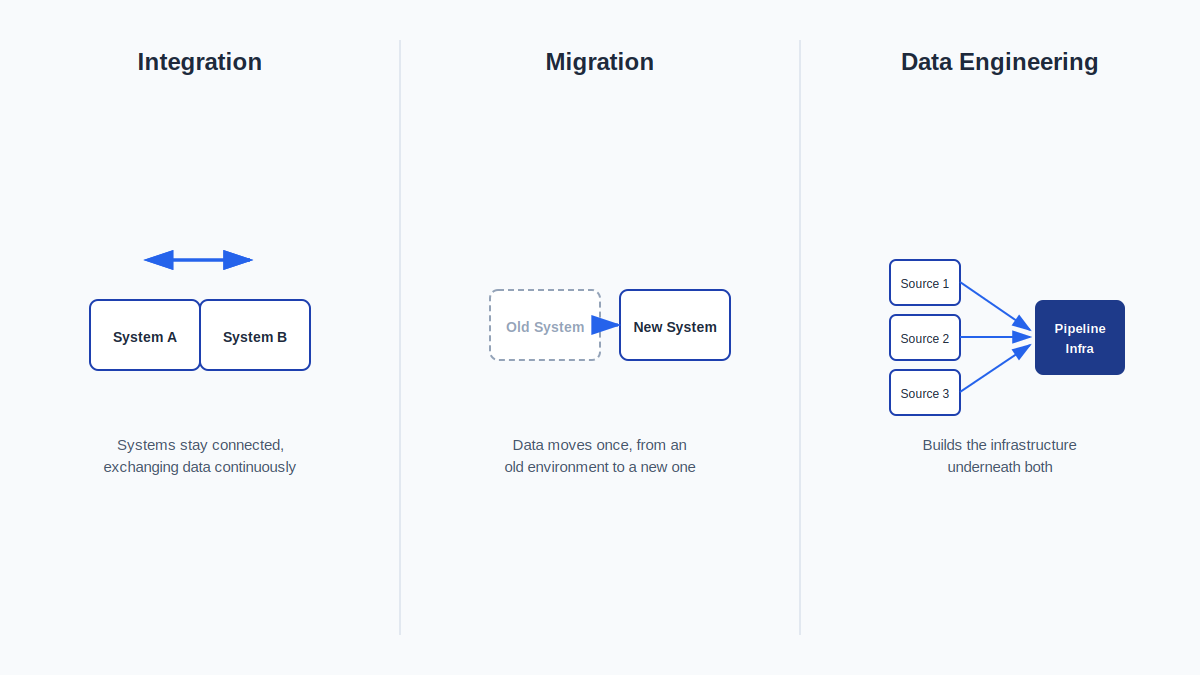
| Service | Primary Purpose | Best When |
|---|---|---|
| Data Integration Services | Keeps different systems connected so information continues flowing between them | You need multiple systems to exchange data on an ongoing basis |
| Data Engineering Services | Builds broader data infrastructure, pipelines, and analytics-ready foundations | You need infrastructure to store, process, and prepare data at scale, beyond connecting existing systems |
| Data Migration Services | Moves data from one environment to another, typically as a one-time project | You’re retiring, replacing, or upgrading a system and need its data moved to the new one |
| Data Analysis Services | Interprets data to answer specific business questions | You already have access to the data you need and want insight drawn from it |
| Business Intelligence Services | Turns prepared data into ongoing reports and dashboards | You need recurring visibility into metrics, built on data that’s already reliable and accessible |
Integration keeps systems talking; migration moves data once; data engineering builds the infrastructure underneath; analysis interprets what’s there; business intelligence reports on it continuously. Many projects involve more than one of these. For example, an integration project that surfaces the need for broader data engineering support as data volume grows.
What You Receive From a Data Integration Project
Deliverables vary by project scope, but typically include a combination of:
- Integration requirements assessment
- Source-system inventory
- Data mapping documentation
- Integration architecture documentation
- APIs and connectors
- Transformation rules
- Automated synchronization workflows
- A validation framework used during testing
- Error handling and recovery logic
- Monitoring configuration
- Technical documentation
- Deployment support
- Handover documentation for your team
Not every project requires every item above. Final deliverables are defined during the discovery phase based on what the integration actually needs.
How Much Do Data Integration Services Cost?
Data integration pricing depends on the specifics of the project rather than a flat rate. The main factors that influence cost include:
- Number of systems being connected
- Complexity of the APIs involved (or absence of an API)
- Data volume and how frequently it changes
- Required synchronization frequency (scheduled vs. near-real-time)
- Whether custom connectors are needed
- Complexity of required data transformations
- Security and access-control requirements
- Involvement of legacy systems
- Monitoring and error-handling requirements
- Documentation and post-deployment support needs
Because these factors vary significantly from one project to the next, integration work is scoped and quoted individually after understanding the systems involved.
Get a Custom Integration Quote
Before You Start: Integration Readiness and Key Questions
Integration Readiness Checklist
Before reaching out, it helps to have a rough answer to the following:
- Which systems need to be connected
- Who owns or administers each system
- Whether each system has an available API
- Which fields need to move between systems
- Which system should be treated as the source of truth for each type of data
- How frequently data needs to synchronize
- Approximate data volumes involved
- Authentication methods each system supports
- Requirements for handling failed or rejected records
- Any security or compliance restrictions that apply
- Which reports or dashboards depend on the data being connected
Questions to Ask Before Integrating Two Systems
- Which platform owns the master customer (or product, or order) record?
- Should updates flow in one direction, or both?
- What should happen when the same record is updated in two systems at once?
- How frequently does information actually need to synchronize?
- How should failed or rejected records be handled: retried, flagged, or logged?
- Who should be notified when an integration error occurs?
- Should historical records be included, or only new activity going forward?
- Which fields should never be overwritten by the integration?
Working through these questions early, even roughly, makes the discovery phase faster and the resulting architecture more accurate. Where data reliability across connected systems is a concern, we also address data quality controls as part of the integration design.
Why Choose DataScienceConsultingPro.com for Data Integration?
- Business-first requirements analysis. We start with what the business needs the data to do, not with a preferred toolset, so the resulting architecture matches the actual problem.
- Transparent project scope. Deliverables and technical approach are defined during discovery, before work begins, so there’s a clear understanding of what’s included.
- Validation before deployment. Integrations are tested against real scenarios, including field mapping, duplicates, failed records, and format edge cases, before they go live.
- Documentation your team can use. Every project includes documentation that explains how the integration works, not just that it works.
- Connected to broader data work. When a project surfaces a need for more than integration, such as broader data engineering, cloud infrastructure, or eventual AI initiatives, we can scope that work as a next step rather than leaving it as a gap.
Frequently Asked Questions
Data integration services connect separate systems (CRM, ERP, databases, SaaS platforms, and others) so information created in one system is automatically available in the others that need it, without manual export and import.
Cost depends on the number of systems, API complexity, data volume, synchronization frequency, and transformation requirements. Projects are scoped individually; contact us for a quote based on your specific systems.
CRM platforms, ERP systems, cloud and on-premise databases, SaaS applications, ecommerce platforms, finance and accounting tools, support platforms, and custom internal applications, among others.
Yes. This is a common integration scenario: connecting CRM data (customer, sales) with ERP data (inventory, finance, operations) so both systems reflect consistent information.
Integration keeps systems connected so data continues flowing between them on an ongoing basis. Migration moves data from an old environment to a new one, typically as a one-time project when a system is being replaced.
Integration connects existing systems so they can exchange data. Data engineering builds the broader infrastructure (pipelines, storage, and processing) that data relies on at scale. Projects sometimes involve both.
Yes, near-real-time synchronization is possible for use cases that require it. Many integrations use scheduled batch synchronization instead, when immediate updates aren’t operationally necessary.
Yes. When a pre-built connector doesn’t exist or doesn’t meet the project’s requirements, we build custom API integrations to connect the systems involved.
Timelines vary based on the number of systems, complexity of the APIs, and scope of the transformation logic required. Timelines are discussed during the discovery phase once the specific systems and requirements are known.
Connect Your Business Data
Disconnected systems don’t resolve themselves. They tend to multiply as more tools get added. If your teams are re-entering the same data across platforms, working from reports that don’t agree, or manually exporting and importing files on a recurring basis, it’s worth a conversation about what a properly built integration would look like for your systems.
Contact our team to discuss your data integration project and get a custom quote based on your systems and requirements.