Clean, Structure, and Connect Your Data for Better Business Decisions
Data Modeling Services help businesses turn scattered, duplicated, and disconnected information into a clean structure that supports reporting, dashboards, business intelligence, and better decision-making. Many companies collect data from spreadsheets, CRMs, websites, payment systems, accounting tools, cloud applications, marketing platforms, customer support tools, and internal databases. However, that information often remains difficult to trust because it is not properly connected, cleaned, or organized. As a result, teams waste time fixing inconsistent reports, explaining mismatched KPIs, and rebuilding the same analysis in different formats.
At Data Science Consulting Pro, we help businesses organize raw data into models that are easier to understand, easier to maintain, and easier to use. Instead of relying on messy files, broken relationships, and manual reporting steps, your team gets a stronger data foundation for analytics, Power BI dashboards, dbt workflows, data warehouses, business intelligence, and executive reporting. In other words, our goal is to make your data more reliable so your business can move faster and make decisions with more confidence.
A strong data model does more than store information. It defines how customers, products, orders, invoices, transactions, campaigns, subscriptions, and revenue connect to one another. Because of that, your reports become easier to build, your dashboards become easier to trust, and your leadership team gets a clearer view of the business. Whether you need a model built from scratch or an existing model improved, professional Data Modeling Services can give your business a cleaner and more scalable reporting foundation.
What Our Data Modeling Services Help You Improve
Our Data Modeling Services can help your business create a cleaner and more reliable foundation for analytics. Instead of forcing your team to work with disconnected spreadsheets, unclear relationships, and inconsistent calculations, we help organize your data so it can support better reporting and smarter decisions.
Our services can help you:
- organize raw data from multiple business systems
- improve dashboard speed and refresh performance
- define cleaner KPI logic across departments
- reduce spreadsheet errors and manual reporting work
- connect customer, sales, finance, marketing, and operations data
- support Power BI and dbt workflows
- create a stronger data warehouse structure
- prepare data for AI and machine learning projects
- improve reporting accuracy across teams
- make business intelligence easier to trust
Why Data Modeling Matters
Most businesses already have data, but having data is not the same as having useful data. A company can collect thousands or even millions of records and still struggle to answer basic questions because the information is scattered, inconsistent, duplicated, or poorly connected. One team may use a spreadsheet, another team may use a CRM, another may rely on accounting software, and another may pull numbers from a dashboard that was built years ago. Without a clear data model, each team may create its own version of the truth.
This creates serious reporting problems. For example, sales may report one number for revenue, finance may report another, and marketing may track leads in a way that does not connect clearly to closed deals. Meanwhile, executives may lose confidence in dashboards because the numbers keep changing or because different reports tell different stories. Analysts may also spend more time cleaning files and fixing joins than actually analyzing performance. These problems are not just technical issues. They affect planning, budgeting, forecasting, customer strategy, and day-to-day decision-making.
Professional Data Modeling Services solve this by creating a clear structure for how data should be organized, connected, cleaned, and used. A strong model defines how customers, products, orders, invoices, transactions, subscriptions, campaigns, revenue, costs, and business rules relate to each other. When the foundation is built correctly, your reports become easier to build, your dashboards become easier to trust, and your teams can make decisions with more confidence.
What Makes a Strong Data Model?
A strong data model does more than organize tables. It creates a clear connection between business questions and the data needed to answer them. The model should make it easy to understand what each field means, where each number comes from, how tables relate, and which rules are used to calculate key metrics. When a model is built well, business users do not need to guess why one report shows a different number from another report.
In addition, a strong data model should be scalable. That means it should work for your current reporting needs while still allowing room for new data sources, new dashboards, new KPIs, and new business questions. As your business grows, your model should not fall apart every time a new CRM, payment platform, marketing tool, operational system, or customer data source is added.
The best data models are also easy to maintain. A model that only one person understands becomes risky for the business. If an analyst leaves, a vendor changes, or a dashboard breaks, your team should still be able to understand the structure, definitions, and logic behind the data. This is why documentation, naming standards, and clear business rules are important parts of professional data modeling.
| Strong Data Model Feature | Why It Matters |
|---|---|
| Clear relationships | Helps tables connect correctly and prevents wrong totals |
| Consistent KPI definitions | Keeps reports aligned across departments |
| Clean naming standards | Makes fields and tables easier to understand |
| Scalable structure | Allows the model to grow with the business |
| Good documentation | Helps teams maintain and trust the model |
| Performance-focused design | Improves dashboard speed and query efficiency |
| Business-friendly logic | Makes reports easier for non-technical users to understand |
Common Data Problems We Solve
Many companies do not realize that their reporting problems come from weak data structure. A slow dashboard, a wrong total, or a confusing KPI may look like a reporting issue on the surface, but the real problem is often the model behind it. When the data structure is unclear, every report becomes harder to build, test, explain, and maintain.
| Data Problem | What It Causes | How Data Modeling Helps |
|---|---|---|
| Messy spreadsheets | Manual errors, duplicated work, and unreliable reporting | Creates structured and repeatable reporting logic |
| Duplicate customer records | Wrong customer counts and poor segmentation | Defines cleaner IDs and matching rules |
| Slow dashboards | Long refresh times and poor usability | Improves relationships and model design |
| Disconnected systems | Incomplete reporting and missing insights | Connects multiple data sources clearly |
| Inconsistent KPIs | Confusion across departments | Standardizes business rules and calculations |
| Weak warehouse structure | Slow queries and difficult maintenance | Builds scalable and reporting-ready models |
| Broken relationships | Wrong totals and broken filters | Fixes joins, keys, and model relationships |
| Poor documentation | Teams do not understand fields or logic | Creates data dictionaries and KPI definitions |
What Are Data Modeling Services?
Data Modeling Services help businesses organize data into a clear structure that supports reporting, analytics, dashboards, business intelligence, and advanced data projects. Data modeling defines what data exists, how data points relate to each other, how information should be stored, and how it should be used to answer business questions. It creates the blueprint that connects raw data to useful insights.
A data model is important because dashboards, reports, data warehouses, and AI systems all depend on the structure behind the data. If that structure is weak, the final output will also be weak. A dashboard may look polished, but if the underlying model has poor relationships, duplicated records, unclear KPIs, or inconsistent transformation logic, the dashboard can still produce wrong or misleading results. Therefore, data modeling helps prevent those issues before they become expensive reporting problems.
A well-designed data model can define important business objects such as customers, orders, products, services, invoices, payments, subscriptions, leads, campaigns, transactions, accounts, users, vendors, locations, revenue, costs, KPIs, and business rules. For example, a retail company may need to connect customer data, order history, product categories, inventory, discounts, returns, payments, and marketing campaigns. A SaaS company may need to connect accounts, users, subscriptions, renewals, churn, product usage, support tickets, and recurring revenue. A finance team may need to connect transactions, budgets, departments, vendors, invoices, revenue, expenses, and profitability.
Good data modeling makes all of this easier to analyze and report on. It gives your business a cleaner structure so teams can understand what the data means, where it comes from, how it connects, and how it should be used.
Types of Data Models We Build
| Type of Data Model | Purpose | Best For |
|---|---|---|
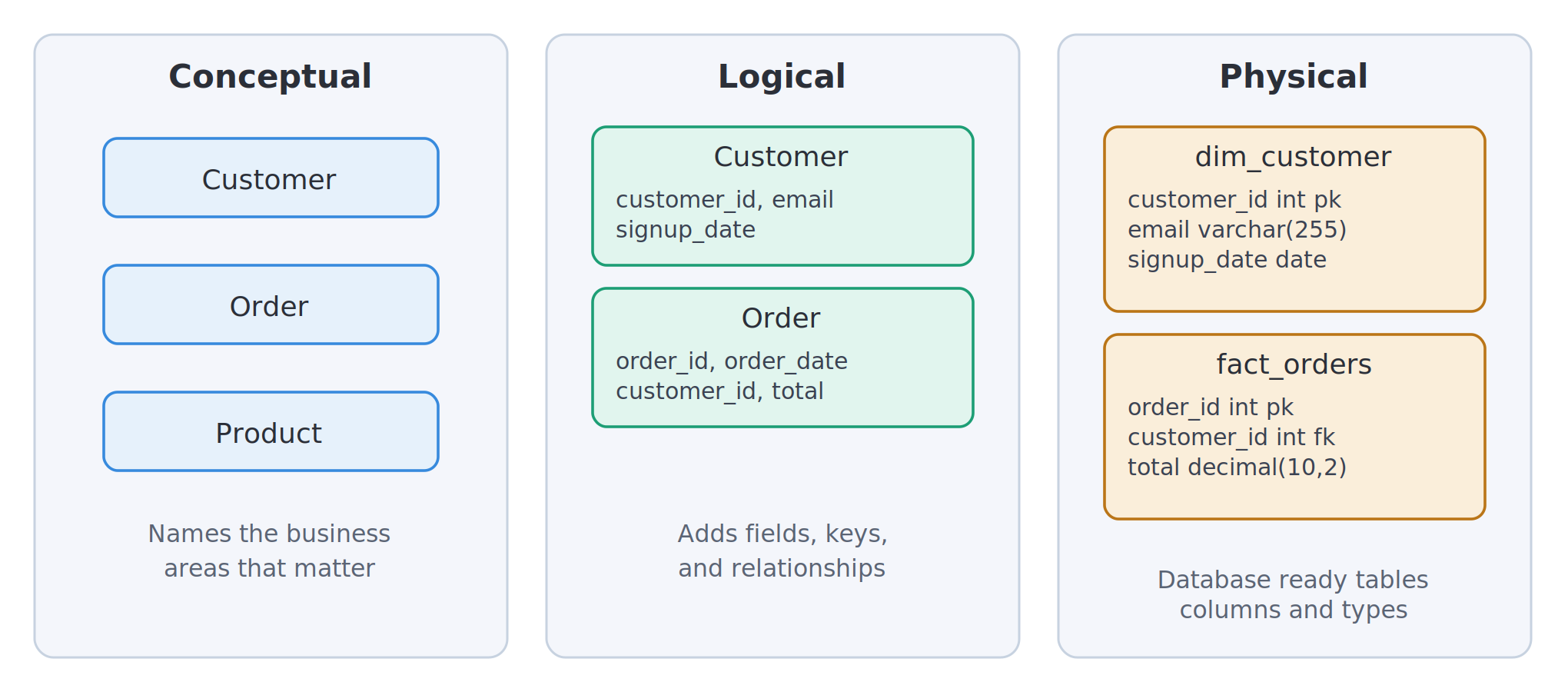
| Conceptual Data Model | Shows the high-level business structure | Planning, stakeholder alignment, and early project design |
| Logical Data Model | Defines entities, fields, rules, and relationships | Database planning, reporting design, and system mapping |
| Physical Data Model | Turns the design into technical database structure | SQL databases, data warehouses, and performance optimization |
| Relational Data Model | Organizes data into related tables | Business systems, CRMs, ERPs, and operational databases |
| Dimensional Data Model | Uses facts and dimensions for analytics | Dashboards, BI tools, reporting, and Power BI |
| Semantic Data Model | Defines business-friendly metrics and KPIs | Self-service analytics, executive reporting, and BI platforms |
Why Your Business Needs Professional Data Modeling Services
Many companies try to build reports directly from raw data. This can work for a short time, especially when the business is small and only a few people are using the reports. However, as the company grows, more systems are added, more teams need dashboards, and more business questions need answers. Eventually, the data environment becomes harder to manage because every report depends on different formulas, different exports, and different assumptions.
Professional Data Modeling Services help prevent that by creating a stronger foundation for reporting and analytics. Instead of forcing every department to clean and interpret data separately, a proper data model gives the company a shared structure. This makes it easier to define KPIs, connect systems, build dashboards, automate reports, and prepare data for advanced analytics. The goal is not just to store data. The goal is to make data clear, connected, reliable, and useful for decision-making.
A well-designed data model helps business owners, executives, analysts, finance teams, sales teams, marketing teams, and operations teams work from the same trusted foundation. When everyone uses the same definitions and relationships, reports become easier to explain and decisions become easier to defend.
Key Benefits of Data Modeling Services
| Benefit | Business Impact |
|---|---|
| Cleaner reporting | Reports become easier to build, review, and trust |
| Faster dashboards | BI tools load faster and refresh more efficiently |
| Better KPI accuracy | Teams use the same definitions and calculations |
| Fewer manual errors | Less copy-paste work and fewer spreadsheet mistakes |
| Stronger BI performance | Business intelligence tools work from structured data |
| Better executive decisions | Leadership can rely on consistent reports |
| Easier integration | Data from multiple systems can connect more clearly |
| Better AI readiness | Clean models support machine learning and forecasting |
| Easier documentation | Teams understand fields, relationships, and rules |
| Scalable analytics | The data structure can grow with the business |
Our Data Modeling Services
At Data Science Consulting Pro, we provide data modeling support for businesses that need cleaner reporting, better dashboards, improved business intelligence, stronger data warehouses, and more reliable analytics. We customize our work around your current systems, data quality, reporting goals, business questions, and internal team needs. Some companies need a complete data model designed from scratch. Others already have a model but need help fixing slow dashboards, confusing relationships, unclear KPI logic, or poorly documented transformations.
We focus on building data models that are practical, business-friendly, and easy to maintain. A good data model should not make your reporting environment more complicated. Instead, it should make your data easier to understand, easier to connect, easier to validate, and easier to use for decisions. Whether your company needs conceptual planning, database design, Power BI cleanup, dbt model structure, or data warehouse modeling, the goal is to create a reliable foundation for analytics.
Data Modeling Service Areas
| Service | What It Includes | Outcome |
|---|---|---|
| Conceptual Data Modeling | High-level business data map | Clear understanding of main business data areas |
| Logical Data Modeling | Entities, fields, keys, rules, and relationships | Better planning before technical development |
| Physical Data Modeling | Tables, columns, data types, indexes, and keys | Database-ready structure |
| Data Warehouse Modeling | Centralized reporting and analytics model | Better historical reporting and BI performance |
| Dimensional Modeling | Fact tables, dimension tables, and star schema | Faster dashboards and cleaner analysis |
| Semantic Modeling | Business-friendly KPI and metric layer | Easier self-service reporting |
| Power BI Modeling | Relationships, DAX, date tables, and model cleanup | Faster and more accurate Power BI dashboards |
| dbt Modeling | Staging, intermediate, and mart models | Cleaner analytics engineering workflow |
| Data Model Optimization | Fixes slow, confusing, or unreliable models | Better speed, clarity, and maintainability |
| Documentation | Data dictionaries, KPI definitions, and lineage | Easier long-term data governance |
Conceptual Data Modeling
Conceptual data modeling creates a high-level picture of your business data before the technical details are built. It helps your team identify the main data areas that matter, such as customers, accounts, products, orders, invoices, payments, campaigns, locations, and revenue. This type of model is especially useful when different stakeholders need to agree on how the business should be represented in data.
For example, a conceptual model may show that customers place orders, orders contain products, products belong to categories, campaigns generate leads, and leads become customers. This type of model does not need to include every column or technical rule. Its purpose is to create a clear business map that helps leaders, analysts, and technical teams align before development begins.
Conceptual modeling is helpful for new data warehouse projects, dashboard planning, business intelligence projects, CRM and ERP data mapping, reporting redesign, analytics strategy, and stakeholder alignment. Ultimately, the final result is a simple but powerful foundation that explains what needs to be modeled and why.
Logical Data Modeling
Logical data modeling adds more detail to the high-level business map. It defines the entities, attributes, relationships, keys, and business rules that shape your data. This step helps translate business needs into a structured design that can later be built inside a database, data warehouse, Power BI model, or transformation workflow.
For example, a customer entity may include a customer ID, name, email, phone number, signup date, customer type, and location. An order entity may include an order ID, customer ID, order date, payment status, fulfillment status, discount amount, tax amount, and total revenue. Logical modeling also defines how those entities connect, such as whether one customer can have many orders or whether one order can contain many products.
This step is important because it reduces confusion before technical development begins. It helps answer questions such as what fields should exist, which fields should be unique, how tables should connect, which business rules should apply, and how customer, order, product, campaign, and revenue data should relate across reports.
Physical Data Modeling
Physical data modeling turns the logical design into a technical structure that can be built inside a database, warehouse, or analytics platform. This may include table names, column names, data types, primary keys, foreign keys, indexes, partitions, naming standards, storage rules, and performance considerations.
A physical model must be designed carefully because poor technical structure can create slow queries, broken joins, large refresh times, and difficult maintenance. For example, a table that is too wide may be hard to manage, while a model with too many unnecessary joins may slow down dashboards. In addition, a poorly indexed database may make reporting queries take longer than necessary.
Our physical data modeling work focuses on building data structures that are usable, scalable, and aligned with your reporting needs. The goal is to create a technical design that supports real business usage, not just data storage.
Data Warehouse Modeling
Data warehouse modeling helps businesses centralize data from different systems into one reporting and analytics environment. A data warehouse may bring together data from CRMs, ERPs, payment platforms, accounting systems, websites, mobile apps, marketing platforms, spreadsheets, APIs, SQL databases, and cloud systems.
Without proper modeling, a data warehouse can become another messy storage system. It may contain many tables, but still fail to provide clean reporting if the relationships, transformations, and business definitions are unclear. A strong data warehouse model organizes data in a way that supports historical trend analysis, executive reporting, department-level analytics, customer insights, revenue tracking, and operational performance monitoring.
With the right data warehouse model, your business can answer questions about sales growth, customer behavior, marketing ROI, product performance, finance trends, and operational efficiency more easily.
Dimensional Data Modeling
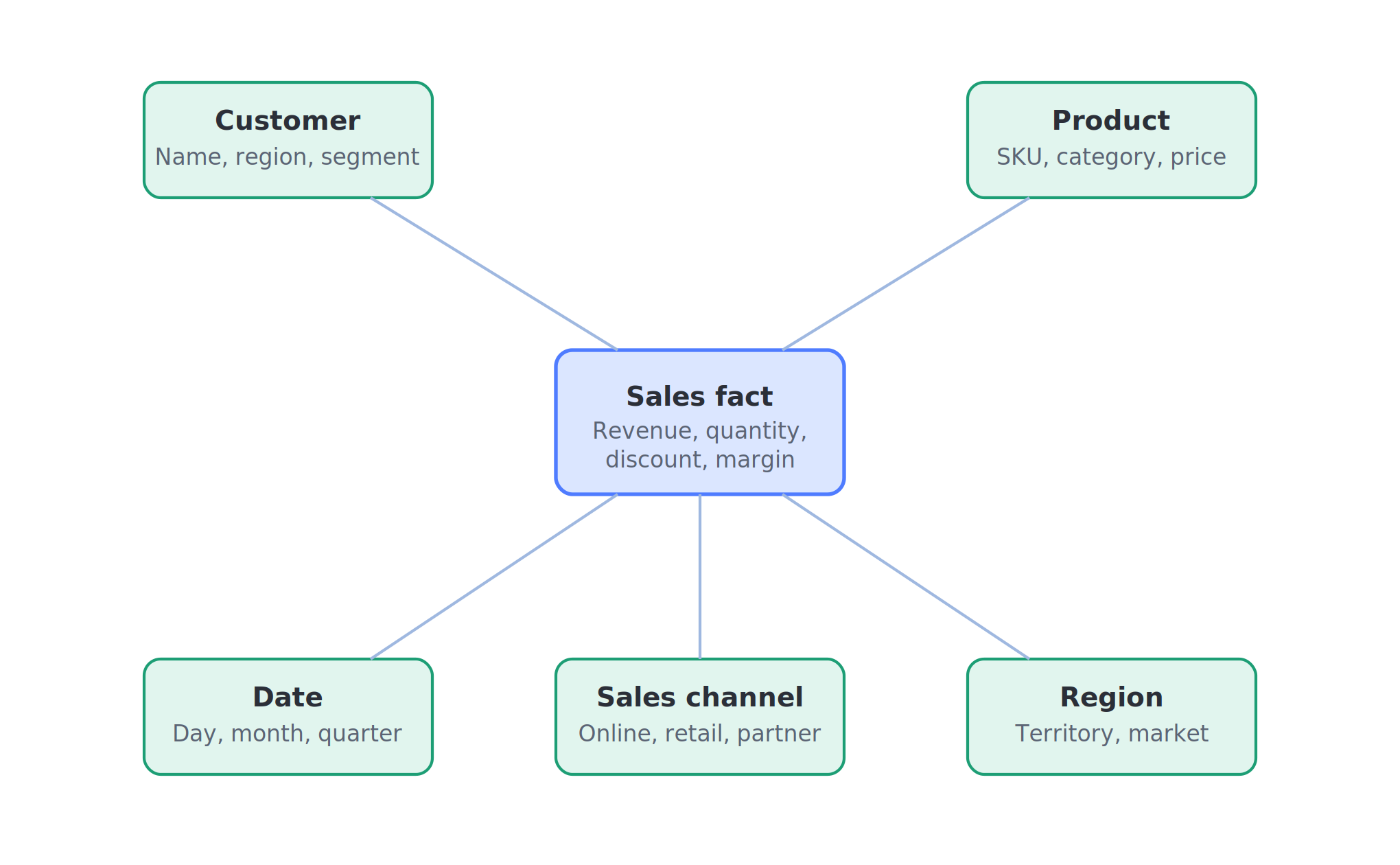
Dimensional data modeling is one of the most useful approaches for analytics and dashboards. It organizes data into fact tables and dimension tables, making it easier for business users and BI tools to filter, group, and analyze information. Fact tables store measurable business activity, while dimension tables provide the context needed to understand that activity.
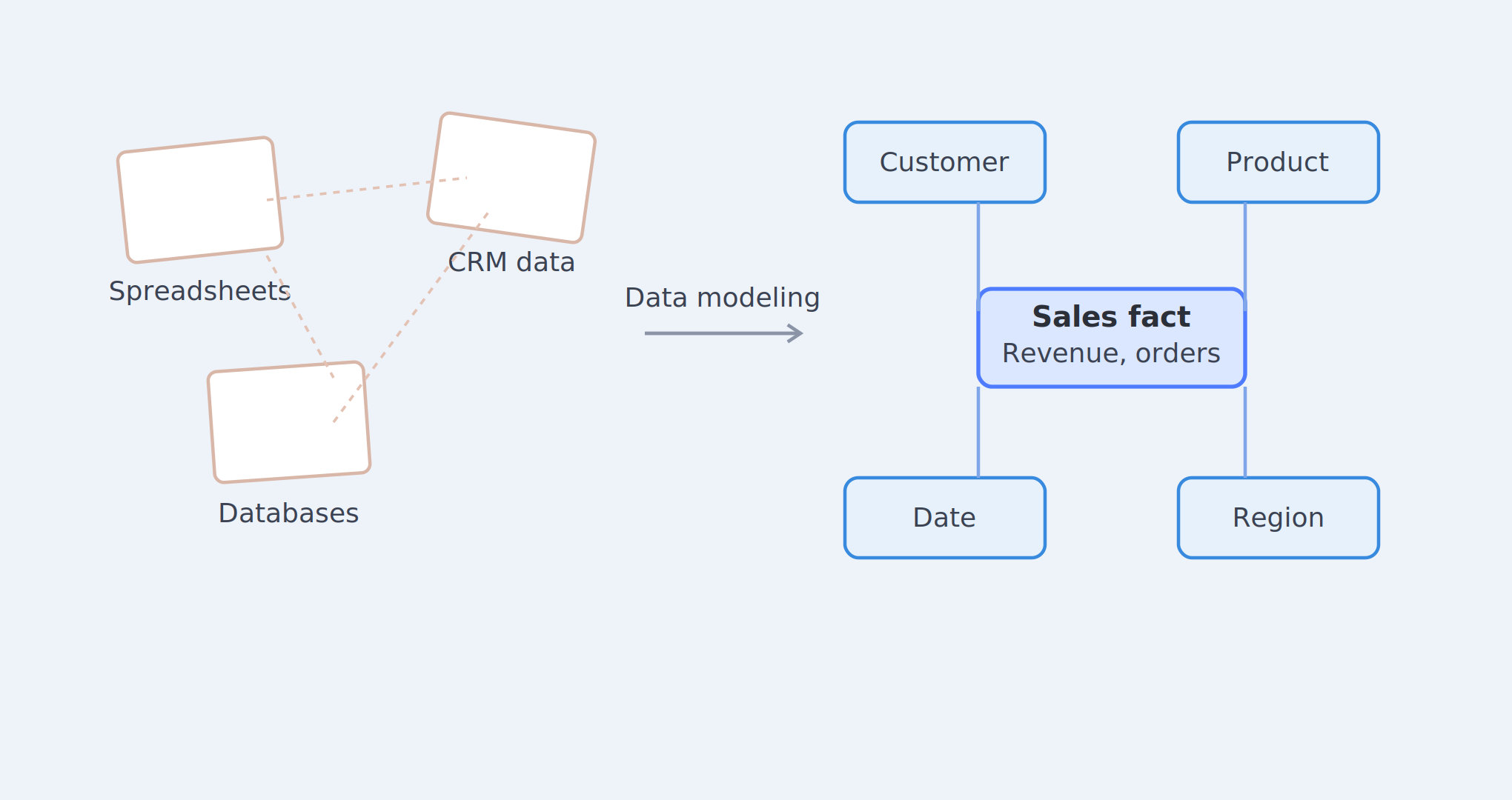
For example, a sales fact table may store revenue, quantity sold, discount amount, and margin. That fact table may connect to dimensions such as customer, product, date, region, and sales channel. This structure makes it easier to answer questions like which products generate the most revenue, which regions are growing fastest, which customers are most valuable, and which channels are producing the best results.
Dimensional modeling is especially helpful for Power BI, Tableau, Looker, and other reporting tools because it creates a cleaner structure for dashboard performance and self-service analytics.
Example Dimensional Model
| Fact Table | Related Dimensions | Example Metrics |
|---|---|---|
| Sales Fact | Customer, Product, Date, Region, Channel | Revenue, Quantity Sold, Discount, Margin |
| Marketing Fact | Campaign, Date, Channel, Audience | Spend, Clicks, Leads, Conversions |
| Finance Fact | Department, Vendor, Date, Account | Cost, Budget, Revenue, Profit |
| Operations Fact | Location, Employee, Date, Service Type | Completion Time, Volume, Cost, Quality Score |
Semantic Data Modeling
Semantic data modeling creates a business-friendly layer that helps users understand and use data without needing to know every technical table or join. It defines the meaning of metrics, fields, filters, hierarchies, and calculations so business users can work with data more confidently.
A semantic model can define important KPIs such as revenue, gross profit, net profit, active customers, churn rate, conversion rate, average order value, sales pipeline value, customer lifetime value, monthly recurring revenue, and year-over-year growth. This matters because many reporting problems come from unclear definitions. One team may calculate revenue one way, while another team calculates it differently.
Semantic models are commonly used in Power BI, Tableau, Looker, and self-service analytics environments. When designed well, they help business users explore data without constantly asking analysts to explain where every number came from.
Power BI Data Modeling Services
Our power bi data modeling services help businesses improve Power BI dashboards, reports, relationships, DAX measures, KPI logic, and model performance. Power BI is a strong reporting platform, but it depends heavily on the quality of the data model behind the report. If the model is poorly structured, even a good-looking dashboard can show wrong numbers, load slowly, or become difficult to maintain.
Many Power BI issues are not visual design problems. Instead, they are data model problems. Broken relationships, missing date tables, weak DAX measures, duplicate fields, unclear table names, and messy Power Query transformations can all create reporting issues. A strong Power BI model helps your team avoid wrong totals, broken filters, slow refreshes, and confusing reports.
Power BI Problems We Help Solve
| Power BI Issue | Likely Cause | Modeling Solution |
|---|---|---|
| Dashboard loads slowly | Large tables, poor schema, heavy DAX | Optimize model structure and calculations |
| Wrong totals | Bad relationships or DAX logic | Fix relationships and measure definitions |
| Broken filters | Incorrect table connections | Rebuild relationship structure |
| Confusing fields | Poor naming and too many unused columns | Clean model and improve naming |
| Refresh failures | Messy source data or inefficient transformations | Simplify model and improve data flow |
| Duplicate KPIs | Different calculations across reports | Create shared measure logic |
| Hard-to-use dashboard | Weak semantic model | Build cleaner business-friendly reporting layer |
What Our Power BI Data Modeling Includes
Our Power BI modeling work may include table relationship cleanup, star schema design, DAX measure improvement, KPI definition, date table setup, role-playing dimensions, data model simplification, calculated column review, Power Query transformation review, slow report troubleshooting, dashboard performance optimization, executive reporting structure, and self-service analytics setup.
A clean Power BI data model helps your team avoid broken visuals, wrong totals, slow dashboards, and confusing reports. It also makes reports easier to maintain because the model is organized around clear relationships, consistent metrics, and business-friendly naming.
dbt Data Modeling Services
Our dbt data modeling services help businesses build clean, modular, and documented SQL transformation workflows. dbt is useful for teams that want to transform raw data into reliable analytics models while keeping the logic organized, tested, documented, and easier to maintain.
A strong dbt project usually includes staging models, intermediate models, and mart models. Each layer has a clear purpose. Staging models clean and standardize raw source data. Intermediate models handle more complex business logic. Mart models create final reporting-ready tables for areas such as sales, finance, marketing, operations, customers, products, or subscriptions.
When dbt is structured properly, it helps teams create repeatable analytics workflows instead of scattered SQL scripts. It also improves collaboration because changes can be tracked, documented, reviewed, and tested before they affect final dashboards.
dbt Model Structure
| dbt Layer | Purpose | Example |
|---|---|---|
| Staging Models | Clean and standardize raw source data | Rename columns, cast data types, remove duplicates |
| Intermediate Models | Organize complex business logic | Combine orders, payments, customers, and product rules |
| Mart Models | Create final reporting-ready tables | Sales mart, finance mart, marketing mart, customer mart |
What Our dbt Data Modeling Includes
Our dbt modeling work may include source setup, staging model structure, intermediate model logic, mart model design, SQL transformation logic, data tests, documentation, model lineage, naming standards, version control workflow, cloud warehouse integration, and analytics engineering support.
dbt is especially helpful for businesses using Snowflake, BigQuery, Redshift, or similar cloud data warehouses. It gives data teams a cleaner way to move from raw source data to trusted reporting tables.
Data Modeling Deliverables
Every project is different, but our data modeling work can include practical deliverables that make your data easier to understand, use, and maintain. The exact deliverables depend on your current systems, project scope, reporting goals, data quality, timeline, and business needs.
A small project may focus on cleaning a Power BI model, fixing relationships, and improving DAX logic. A larger project may include conceptual diagrams, logical models, physical schema design, data warehouse modeling, dbt transformation layers, documentation, and dashboard-ready reporting tables. The purpose of each deliverable is to make your data structure more useful and easier to trust.
| Deliverable | Description |
|---|---|
| Conceptual Data Model | High-level map of key business entities and relationships |
| Logical Data Model | Detailed structure showing fields, keys, rules, and relationships |
| Physical Data Model | Database-ready design with tables, columns, and technical rules |
| Entity Relationship Diagram | Visual diagram showing how entities connect |
| Star Schema Design | Analytics-friendly model using fact and dimension tables |
| Snowflake Schema Design | Normalized dimensional model for more complex reporting |
| Semantic Model Design | Business-friendly layer for KPIs, metrics, and filters |
| Power BI Model Cleanup | Improved relationships, DAX, date tables, and performance |
| dbt Model Structure | Staging, intermediate, and mart model framework |
| Data Dictionary | Documentation of fields, definitions, and usage |
| KPI Definitions | Clear metric logic for reporting consistency |
| Source-to-Target Mapping | Map showing how data moves from sources to final models |
| Data Quality Rules | Validation checks for accuracy and consistency |
| Performance Recommendations | Suggestions to improve speed, refresh times, and usability |
Schema Design for Analytics and Reporting
Schema design is one of the most important parts of data modeling. A schema defines how tables are arranged, how they connect, and how users can query the data. The right schema can improve dashboard speed, reporting accuracy, and data usability. The wrong schema can create slow reports, confusing joins, duplicated logic, and inconsistent metrics.
For analytics and business intelligence, schema design should support how users actually ask questions. A finance team may need monthly revenue, expenses, and profitability by department. A sales team may need pipeline, closed deals, lead source, and account performance. A marketing team may need campaign spend, clicks, leads, conversions, and ROI. A good schema organizes these data points so they can be filtered, compared, and reported clearly.
Common Schema Types
| Schema Type | Description | Best Use Case |
|---|---|---|
| Star Schema | Fact table connected directly to dimensions | Power BI, Tableau, dashboards, BI reporting |
| Snowflake Schema | Dimensions are normalized into related tables | Complex analytics with structured hierarchies |
| Relational Schema | Data stored in connected operational tables | CRMs, ERPs, applications, databases |
| Flat Reporting Table | Wide table created for simple reporting | Small dashboards, exports, quick reporting |
| Normalized Model | Reduces duplication through many related tables | Operational systems and data consistency |
| Denormalized Model | Combines data for easier querying | Analytics and performance-focused reporting |
| Semantic Layer | Business-friendly layer over technical data | Self-service BI and executive reporting |
Why Schema Design Matters
Schema design affects how well your reporting system performs. A dashboard with a poor schema may require too many joins, complex calculations, and heavy transformations. This can make reports slow, difficult to maintain, and harder for business users to understand.
A strong schema helps improve dashboard speed, reduce reporting errors, simplify KPI calculations, strengthen data relationships, improve self-service analytics, support business intelligence tools, and make future data changes easier. For analytics and BI, star schemas are often helpful because they make facts and dimensions easier to understand. For operational systems, relational schemas may be better. For executive reporting, semantic models may provide the best user experience.
Trusted Tools and Platforms Used in Data Modeling
The right data model should work well with the tools your business already uses. For example, companies building dashboards often rely on Microsoft Power BI, while teams managing transformation workflows may use dbt. In addition, businesses building cloud-based reporting environments often use platforms such as Snowflake, Google BigQuery, or Amazon Redshift. These tools are not the strategy by themselves, but they support strong Data Modeling Services when the underlying structure is designed correctly.
| Category | Tools and Platforms |
|---|---|
| BI and Reporting | Power BI, Tableau, Looker Studio, Excel |
| Data Transformation | SQL, Python, dbt, Power Query |
| Cloud Warehouses | Snowflake, BigQuery, Redshift, Azure Synapse, Microsoft Fabric |
| Databases | SQL Server, PostgreSQL, MySQL |
| Cloud Platforms | AWS, Azure, Google Cloud |
| Data Sources | APIs, CRM systems, ERP systems, marketing platforms, payment systems |
These tools may be used depending on the project scope. Some businesses may only need Power BI model cleanup, while others may need a full data warehouse model with SQL transformations, dbt, and BI dashboards. The right setup depends on what your business is trying to measure, how much data you have, and how your team needs to use it.
Data Modeling Services Across the USA
Data Science Consulting Pro provides remote and project-based data modeling services usa businesses can use to improve reporting, dashboards, business intelligence, cloud analytics, Power BI, dbt, and data warehouse projects. Because most data modeling work can be completed remotely, we can support businesses across different cities and industries without requiring an on-site team.
Businesses searching for data modeling services nyc often need help connecting finance, sales, customer, and marketing data in fast-moving environments. Companies looking for data modeling services chicago may need stronger reporting models for logistics, healthcare, finance, manufacturing, or operations. We also support organizations looking for data modeling services indianapolis, especially teams that need better analytics for operations, education, healthcare, and professional services.
Businesses searching for data modeling services atlanta may need support with dashboards, BI, cloud analytics, and data warehouse modeling. Companies looking for data modeling services dallas may need cleaner reporting structures for sales, finance, marketing, real estate, SaaS, or growing operations. Whether your company is in a major city or serving customers nationwide, our goal is to help you organize your data so your team can use it with confidence.
Industries We Support
Different industries use data in different ways. A strong data model should reflect how the business actually works, not just how the data happens to be stored. Healthcare data is different from eCommerce data. SaaS metrics are different from real estate reporting. Finance teams need different structures from marketing agencies. That is why professional Data Modeling Services should be designed around the business context, reporting goals, and decision-making needs of each organization.
| Industry | Common Data Needs | Data Modeling Benefit |
|---|---|---|
| Healthcare | Patient data, claims, appointments, providers | Better operational and compliance reporting |
| Finance | Transactions, budgets, invoices, risk, revenue | Cleaner financial dashboards and forecasting |
| Retail and eCommerce | Customers, orders, products, inventory, marketing | Better customer and product performance insights |
| SaaS and Technology | Subscriptions, users, churn, product usage | Stronger SaaS metrics and lifecycle analytics |
| Real Estate | Properties, leads, leases, occupancy, rent | Better portfolio and investor reporting |
| Education | Enrollment, attendance, programs, performance | Cleaner student and program reporting |
| Manufacturing | Production, inventory, suppliers, quality | Better operational and demand planning analytics |
| Logistics | Shipments, routes, costs, delivery times | Stronger performance and cost tracking |
| Marketing Agencies | Campaigns, spend, leads, attribution, ROI | Cleaner client reporting and campaign analysis |
| Professional Services | Clients, projects, billing, utilization | Better revenue and profitability reporting |
Healthcare Data Modeling
Healthcare organizations manage complex data across patients, appointments, providers, claims, billing, operations, and compliance reporting. A clean data model can help healthcare teams track appointment volume, provider performance, claims status, patient trends, billing patterns, service demand, and operational efficiency.
This helps leadership and administrative teams make better decisions from reliable reporting. It also makes it easier to organize data for dashboards, internal reporting, and operational reviews. When healthcare data is modeled correctly, teams can reduce confusion between clinical, financial, and operational reports.
Finance Data Modeling
Finance teams need accurate data for reporting, budgeting, forecasting, compliance, and business planning. A finance data model can connect transactions, departments, vendors, invoices, accounts, revenue, expenses, budgets, and profitability.
This reduces the risk of conflicting reports and makes financial dashboards easier to trust. When the data structure is clear, finance teams can spend less time fixing spreadsheet errors and more time analyzing performance, planning cash flow, reviewing trends, and supporting leadership decisions.
Retail and eCommerce Data Modeling
Retail and eCommerce businesses need to understand customers, products, orders, inventory, discounts, returns, marketing channels, and repeat purchase behavior. These data points often live in different platforms, which makes reporting difficult without a clear model.
A strong model helps teams analyze product performance, customer value, revenue trends, inventory movement, average order value, return rates, and marketing ROI. It also helps connect sales activity to customer behavior and campaign performance so teams can make smarter decisions about pricing, promotions, inventory, and customer retention.
SaaS and Technology Data Modeling
SaaS companies need structured data for accounts, users, subscriptions, churn, renewals, upgrades, downgrades, product usage, support tickets, and revenue. Without a clean model, SaaS metrics can become difficult to calculate and easy to misinterpret.
A clean model helps teams calculate important SaaS metrics such as monthly recurring revenue, annual recurring revenue, customer lifetime value, churn rate, retention rate, activation, expansion revenue, and product engagement. This supports better decision-making across sales, customer success, product, finance, and leadership teams.
Real Estate Data Modeling
Real estate businesses often manage data across properties, leads, leases, tenants, rent, occupancy, maintenance, investor reporting, sales activity, and market performance. Without a strong data model, it can be difficult to understand which properties are performing well, which lead sources are converting, or how occupancy and revenue are changing over time.
A real estate data model can help connect property details, financial performance, leasing activity, marketing campaigns, maintenance costs, and portfolio-level reporting. This gives owners, operators, investors, and management teams a cleaner way to review performance and make decisions.
Education Data Modeling
Education organizations need structured data for enrollment, student performance, attendance, programs, courses, retention, staff, and reporting. This data may come from student information systems, learning platforms, spreadsheets, surveys, and administrative tools.
A strong education data model helps schools, universities, training programs, and education companies understand student progress, program outcomes, enrollment trends, attendance patterns, and operational performance. Cleaner data also makes reporting easier for administrators, department heads, and leadership teams.
Manufacturing Data Modeling
Manufacturing companies often need to connect production data, inventory, suppliers, quality control, demand planning, equipment, labor, costs, and operational KPIs. When these areas are not properly modeled, it becomes difficult to understand production efficiency, inventory movement, defect rates, supplier performance, and cost trends.
A manufacturing data model can help organize production events, materials, orders, suppliers, machines, locations, and quality metrics. This creates a stronger foundation for operational dashboards, demand planning, quality analysis, and performance reporting.
Logistics Data Modeling
Logistics companies rely on data related to shipments, routes, delivery times, carriers, fleets, customers, costs, and service levels. If the data is disconnected, teams may struggle to understand delivery performance, route efficiency, operating costs, and customer service trends.
A logistics data model can help connect shipment records, route data, driver or carrier performance, delivery timing, fuel or transport costs, and customer orders. This makes it easier to monitor performance, reduce delays, improve planning, and identify cost-saving opportunities.
Marketing Agency Data Modeling
Marketing agencies often work with data from ad platforms, websites, CRMs, email tools, SEO platforms, social media platforms, call tracking tools, and client reporting dashboards. Without a clean data model, campaign reporting can become messy, especially when clients want to understand spend, leads, conversions, attribution, and ROI.
A strong marketing data model helps agencies connect campaign spend, impressions, clicks, leads, conversions, revenue, channels, and client performance. This makes reports easier to explain and helps clients understand which marketing activities are producing results.
Professional Services Data Modeling
Professional service firms need to understand clients, projects, billing, utilization, revenue, profitability, team capacity, and service delivery. This data may come from project management systems, accounting platforms, time tracking tools, CRMs, and spreadsheets.
A professional services data model can help connect project activity, employee time, invoices, client accounts, expenses, and revenue. This makes it easier to track profitability, manage workload, review client performance, and improve operational planning.
Our Data Modeling Process
A successful data modeling project should follow a clear process. This helps reduce confusion, improve quality, and make sure the final model supports real business needs. Instead of jumping straight into tables and dashboards, the process should begin with understanding the business, the data sources, the reporting goals, and the problems that need to be fixed.
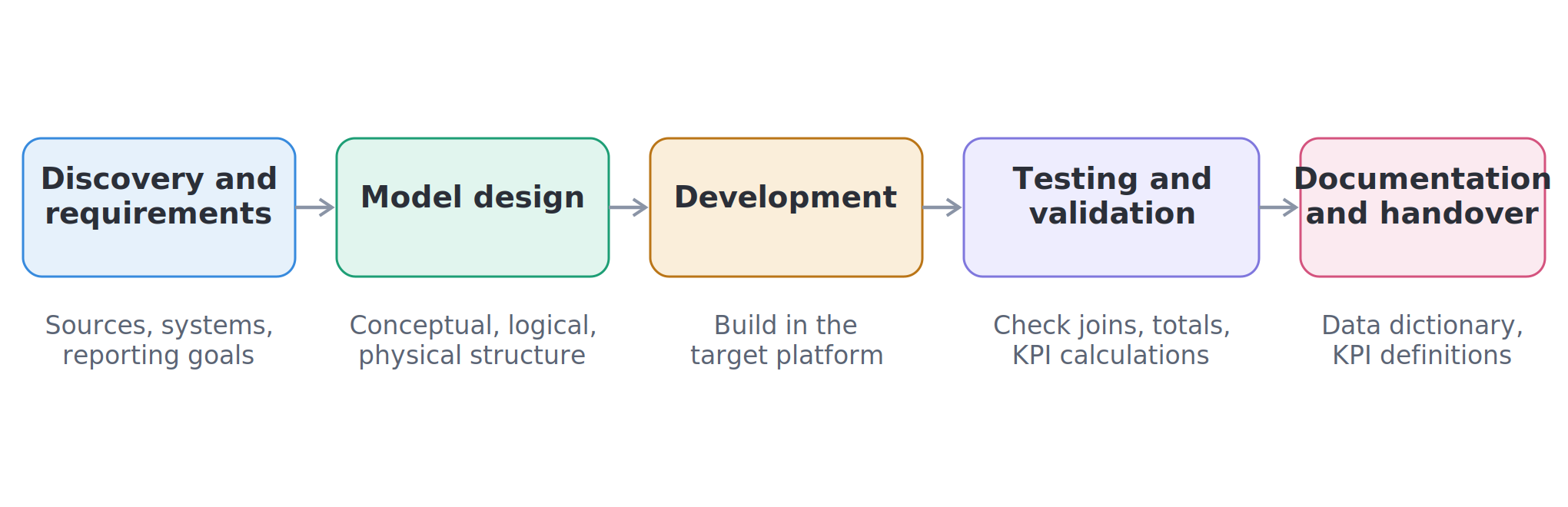
| Step | Process Stage | What Happens |
|---|---|---|
| 1 | Data Discovery | Review current sources, systems, reports, and pain points |
| 2 | Business Requirements Review | Define what the business needs to measure and report |
| 3 | Source System Assessment | Review CRMs, databases, spreadsheets, APIs, and platforms |
| 4 | Relationship Mapping | Identify how entities connect across systems |
| 5 | Data Model Design | Create the conceptual, logical, physical, or dimensional model |
| 6 | Cleaning and Transformation Planning | Define rules for cleaning, mapping, and validation |
| 7 | Model Development | Build the model in the right platform |
| 8 | Testing and Validation | Check joins, calculations, KPIs, and outputs |
| 9 | Reporting Integration | Connect the model to dashboards or reports |
| 10 | Documentation | Document fields, logic, rules, and definitions |
| 11 | Optimization | Improve speed, accuracy, and scalability over time |
1. Data Discovery
We begin by reviewing your current data environment. This includes identifying where your data lives, how your team uses it, which reports matter most, and what problems are affecting decision-making. Data discovery may include reviewing spreadsheets, databases, dashboards, CRM exports, accounting systems, marketing platforms, cloud tools, APIs, and manual reports.
The purpose is to understand the full picture before designing a solution. This step helps identify whether the main issue is messy source data, poor relationships, unclear KPIs, slow dashboards, weak documentation, or a data structure that no longer fits the business.
2. Business Requirements Review
Next, we identify what your business needs to measure. This may include revenue, profit, customer growth, sales pipeline, marketing ROI, churn, retention, inventory, operational performance, financial trends, or executive scorecards. Clear requirements help make sure the model supports useful decisions instead of just creating technical tables.
This step also helps define who will use the data and how they will use it. A model for executives may need simple KPIs and high-level trends, while a model for analysts may need more detailed fields, filters, and drill-down options.
3. Source System Assessment
A data model depends on the quality and structure of the source systems. We review the systems that feed your data environment and identify possible issues with formats, naming, duplicates, missing values, disconnected records, or inconsistent definitions.
This helps define what needs to be cleaned, transformed, mapped, or connected. For example, one system may call a customer ID customer_id, another may call it account_number, and another may not have a stable unique identifier at all. These issues must be understood before the model is designed.
4. Data Relationship Mapping
Relationship mapping defines how important business entities connect. This may include customers, accounts, orders, products, invoices, campaigns, payments, subscriptions, locations, users, employees, or vendors. This step is important because broken relationships often lead to wrong reports and confusing dashboard totals.
For example, if customer data does not connect properly to order data, customer lifetime value may be wrong. If campaign data does not connect properly to lead and sales data, marketing ROI may be difficult to trust. Relationship mapping helps prevent these issues.
5. Data Model Design
After the data and business requirements are clear, we design the model. The design may include conceptual diagrams, logical models, physical tables, dimensional schemas, semantic layers, Power BI models, or dbt model structures.
The goal is to create a model that is useful, accurate, and scalable. A good design should support the current reporting need while also being flexible enough to handle future data sources, new metrics, and growing business requirements.
6. Data Cleaning and Transformation Planning
Most raw data needs some level of cleaning before it can be modeled properly. This step defines how duplicate records, missing values, inconsistent formats, mismatched fields, and incorrect categories should be handled.
Transformation planning also defines how raw fields become business-ready reporting fields. For example, raw transaction records may need to be grouped into revenue categories, customer records may need to be deduplicated, and campaign names may need to be standardized before they can be used in dashboards.
7. Model Development
Once the design is approved, we build the model in the appropriate platform. This may include SQL databases, cloud warehouses, Power BI, dbt, Excel reporting structures, or other analytics tools depending on the project.
The development stage turns the design into a working structure. During this stage, tables, relationships, transformations, measures, and reporting layers are created according to the approved model.
8. Testing and Validation
We test the model to confirm that it works correctly. This includes checking relationships, joins, totals, filters, KPI calculations, and dashboard outputs. This stage is important because even a small relationship issue can create incorrect reporting results.
Validation also helps compare the new model against known business numbers. For example, if finance has an approved revenue total for a period, the model can be checked against that number to make sure the logic is aligned.
9. Dashboard or Reporting Integration
After testing, we connect the model to reports or dashboards. This may include Power BI, Tableau, Looker Studio, Excel, or custom reporting tools. A good model makes reporting easier because the structure is already clean and business-ready.
This step helps ensure that final dashboards are built on reliable relationships, clear KPIs, and consistent business rules. It also reduces the amount of manual cleanup required each time a report is updated.
10. Documentation
We include documentation so your team can understand and maintain the model. This may include data dictionaries, KPI definitions, field descriptions, source mappings, relationship notes, transformation rules, and refresh logic.
Good documentation makes the model easier to maintain long term. It also helps new employees, analysts, vendors, and leadership teams understand how reports are built and what the numbers mean.
11. Ongoing Optimization
As your business grows, your data model may need updates. New systems may be added. KPIs may change. Reporting needs may expand. Dashboards may need to perform faster. Ongoing optimization helps keep the model useful as your business changes.
Optimization may include improving query performance, simplifying relationships, adding new data sources, improving DAX measures, restructuring dbt models, or updating documentation as the business evolves.
Data Modeling for Better Dashboards
Dashboard development should not begin with messy data. A dashboard may look professional, but if the model behind it is weak, the numbers may still be wrong. Poor data models can create wrong KPI totals, broken filters, slow dashboard loading, duplicate records, confusing fields, inconsistent calculations, reports that do not match, and low trust from executives.
A clean model makes dashboard development easier because the data is already organized for reporting. It also helps business users filter, compare, and understand the data more confidently. For example, a dashboard built on a star schema is often easier to maintain than a dashboard built from multiple disconnected spreadsheets. The structure behind the dashboard determines how easy it is to calculate metrics, apply filters, and explain results.
Good data modeling also improves self-service analytics. When fields are clearly named, relationships are correct, and KPIs are defined, users can explore data without constantly asking analysts to fix reports or explain calculations.
If your dashboards are slow, confusing, or hard to trust, our Dashboard Development Services can help you build reporting tools on a stronger foundation.
Data Modeling for Business Intelligence
Business intelligence depends on clean, structured, and reliable data. Without a strong model, every department may build reports differently. Sales may define customers one way, marketing may define leads another way, finance may calculate revenue differently from operations, and leadership may receive reports that do not match.
A BI-ready data model gives your organization one trusted structure for sales analytics, marketing analytics, finance reporting, operations dashboards, customer analysis, executive scorecards, product performance reporting, revenue analysis, and trend reporting. This does not mean every team loses flexibility. It means every team works from shared definitions and reliable relationships.
For broader BI support, explore our Business Intelligence Services..
Data Modeling for Data Cleaning and Data Quality
Data modeling and data cleaning work together. Data cleaning improves the quality of raw data, while data modeling organizes that cleaned data into a usable structure. If the data is not cleaned, the model may still contain errors. If the model is not structured properly, even cleaned data may still be hard to report on.
For example, your business may have duplicate customers, inconsistent naming, missing values, mismatched date formats, incorrect joins, and outdated records. Cleaning helps fix these issues. Modeling helps define where the cleaned data belongs and how it should connect to other data. A strong model can also include validation rules that help reduce future reporting problems.
If poor data quality is affecting your reports, our Data Cleaning Services can help improve the accuracy of your analytics.
Data Modeling for Data Analysis and Visualization
Analysts need structured data to create useful insights. When data is messy, analysts spend too much time cleaning files, fixing joins, checking formulas, and rebuilding reports. This slows down analysis and increases the risk of errors.
A strong model gives analysts a better starting point. It makes it easier to compare performance, identify patterns, calculate KPIs, create visual reports, and explain findings to business users. Good data modeling supports descriptive analysis, diagnostic analysis, predictive analysis, customer analysis, sales analysis, financial analysis, marketing analysis, operations analysis, and data visualization.
For support with analysis and visuals, visit our Data Analysis Services
Data Modeling Services for AI and Machine Learning Readiness
AI and machine learning projects depend on strong data. If the underlying data is poorly structured, inconsistent, duplicated, or missing important context, AI results can be weak or misleading. Even advanced tools cannot fully compensate for a poor data foundation.
Professional data modeling helps prepare your data for advanced analytics by creating cleaner structures, consistent features, better relationships, and clearer definitions. A strong model can support clean training data, feature consistency, customer segmentation, churn prediction, sales forecasting, demand planning, fraud detection, recommendation systems, predictive analytics, machine learning pipelines, and AI-driven reporting.
Before investing heavily in AI, your business should make sure the data foundation is ready. Better modeling helps make advanced analytics more reliable because the data is easier to understand, validate, and use.
Why Choose Data Science Consulting Pro?
Choosing the right data modeling partner matters because your data model becomes the foundation for reporting, dashboards, business intelligence, forecasting, and future analytics projects. A weak model can create long-term reporting problems, while a strong model can make your data environment easier to manage, easier to scale, and easier to trust.
At Data Science Consulting Pro, we focus on practical data models that support real business decisions. The goal is not to make your data environment more complicated. The goal is to make your data easier to connect, easier to report on, and easier to use across departments. We help connect the technical structure of your data to the actual business outcomes your team needs.
We also focus on clarity. A data model should not be a hidden technical system that only one person understands. It should include clear logic, documentation, business definitions, and reporting rules so your team can continue using the model with confidence after the project is completed.
Why Businesses Work With Us
| Reason | What It Means for You |
|---|---|
| Business-first approach | We design around the decisions, reports, and KPIs your team actually needs |
| Custom model design | Your model is built around your systems, data sources, and goals |
| Strong reporting focus | Models are designed to support dashboards, BI, analytics, and executive reporting |
| Power BI support | We can improve relationships, DAX logic, date tables, and dashboard performance |
| dbt support | We can help structure staging, intermediate, and mart models for cleaner analytics workflows |
| Clear documentation | Your team gets better visibility into fields, relationships, metrics, and business rules |
| Practical recommendations | We focus on solutions that fit your tools, timeline, budget, and internal capacity |
| Scalable structure | Your model is designed to support growth, new data sources, and future reporting needs |
| Data quality awareness | We consider duplicates, missing values, inconsistent formats, and validation rules |
| USA-wide consulting | We can support businesses remotely across different cities and industries |
Our Approach Is Built Around Business Outcomes
A good data model should help your business answer important questions faster. It should make it easier to understand revenue, customers, products, campaigns, operations, finance, and performance trends. It should also reduce confusion when different teams compare reports.
That is why our approach starts with business goals before technical design. We look at what your team needs to measure, where your data currently lives, what reports are causing problems, and which decisions depend on better data. From there, we design a model that supports your actual workflow instead of forcing your business into a generic structure.
Clear Deliverables and Documentation
Many data projects fail because the final output is not clearly documented. A dashboard may be delivered, but the team may not understand how the numbers are calculated, where the data comes from, or what should happen when something changes.
Our data modeling work can include documentation such as data dictionaries, KPI definitions, source-to-target mappings, relationship notes, transformation rules, naming standards, and performance recommendations. This helps your team understand the model and reduces the risk of future confusion.
Who Should Use Our Data Modeling Services?
Our Data Modeling Services are useful for companies and teams that need cleaner, more reliable data for reporting and decisions. You may need data modeling support if you are a business owner, operations leader, finance manager, marketing team, sales team, data analyst, BI team, SaaS company, startup, growing company, agency, or company preparing for AI or machine learning.
You may also need help if your dashboards are slow, your reports show different numbers, your team uses too many spreadsheets, your Power BI model is messy, your dbt project is confusing, your data warehouse is hard to query, your KPIs are unclear, or your analysts spend too much time cleaning data. These are signs that the issue may not be the dashboard itself, but the data structure behind it.
Signs You Need Data Modeling Help
| Sign | What It Means |
|---|---|
| Your reports show different numbers | KPI logic may be inconsistent |
| Your dashboards are slow | The model may not be optimized |
| Your team uses too many spreadsheets | Data may need to be centralized and structured |
| Your Power BI model is messy | Relationships and DAX may need cleanup |
| Your dbt project is confusing | Model layers may need better organization |
| Your data warehouse is hard to query | Schema design may need improvement |
| Your KPIs are unclear | Definitions and documentation may be missing |
| Your analysts spend too much time cleaning data | The data model may not be analytics-ready |
When Should You Invest in Data Modeling Services?
Many businesses wait too long before improving their data model. They often try to fix reporting problems by creating more spreadsheets, adding more dashboard pages, or asking analysts to manually clean the same data every month. These short-term fixes may help for a while, but they usually make the data environment more complicated over time.
You should consider professional Data Modeling Services when reporting problems start affecting decisions, productivity, or trust. If your team spends too much time explaining why numbers do not match, your dashboards are slow, or your analysts keep rebuilding the same reports, the issue may be the data structure behind the scenes.
| Situation | Why Data Modeling Helps |
|---|---|
| You are building new dashboards | A clean model prevents slow reports and wrong KPIs |
| You are moving to Power BI | Proper relationships and DAX logic improve reporting accuracy |
| You are using dbt | Clear model layers improve transformation workflows |
| You are building a data warehouse | Strong schema design supports scalable reporting |
| Your reports do not match | Shared definitions reduce confusion across teams |
| Your analysts spend too much time cleaning data | Better structure reduces repeated manual work |
| You are preparing for AI | Clean, structured data improves machine learning readiness |
| Your business is growing | Scalable models support new systems, teams, and KPIs |
Investing in data modeling early can save time later. It helps prevent messy reporting environments, reduces duplicated work, and gives your team a stronger foundation for analytics, dashboards, and strategic decisions.
What Happens After You Request a Quote?
Requesting a quote is simple. The goal is to understand your data problem, review your needs, and recommend the right project scope. First, you share your data challenge through the quote form. Then, Data Science Consulting Pro reviews your needs, systems, current reports, dashboards, and possible scope.
A discovery follow-up may be scheduled if more details are needed. During that review, your tools, reports, dashboards, data sources, business goals, and timeline may be discussed. After the project needs are understood, you receive a recommended project approach. Work begins after the scope is approved.
| Step | What Happens |
|---|---|
| 1. Submit Request | You share your data challenge through the quote form |
| 2. Project Review | We review your needs, systems, and possible scope |
| 3. Discovery Follow-Up | A call or follow-up may be scheduled for more details |
| 4. Data Environment Review | Your tools, reports, dashboards, and data sources are reviewed |
| 5. Recommended Scope | You receive a suggested project approach |
| 6. Project Start | Work begins after the scope is approved |
Frequently Asked Questions About Data Modeling Services
Data modeling services help businesses organize raw data into clear, structured, and usable models for reporting, dashboards, business intelligence, analytics, and machine learning. This may include conceptual models, logical models, physical models, dimensional models, semantic models, Power BI models, dbt models, data warehouse structures, and reporting tables.
The goal is to make your data easier to understand, connect, analyze, and trust. Instead of every team working from scattered files and different definitions, data modeling creates a cleaner foundation for consistent reporting and better decisions.
Your business may need data modeling if your data is scattered across multiple systems, difficult to report on, or inconsistent across teams. A proper data model helps connect customers, orders, products, invoices, payments, transactions, campaigns, and revenue into a structure that supports reliable reporting.
This makes dashboards more accurate, business intelligence more useful, and decision-making easier. It also reduces manual work because teams no longer need to rebuild the same logic in different spreadsheets or reports.
Data modeling organizes and structures data so it can be used effectively. Data analysis uses that structured data to answer questions, identify trends, and support decisions. In simple terms, data modeling builds the foundation, while data analysis uses the foundation to create insights.
Both are important, but analysis becomes much harder when the data model is weak. If the data is not properly structured, analysts may spend more time cleaning, joining, and validating data than actually analyzing it.
Data cleaning fixes quality issues such as duplicates, missing values, inconsistent formats, incorrect records, and messy fields. Data modeling organizes cleaned data into a useful structure for reporting, dashboards, and analytics.
They work together. Clean data improves the model, and a good model helps keep reporting more consistent. If your data is dirty and poorly modeled, reports can become difficult to trust even when the dashboard design looks professional.
Yes. We provide power bi data modeling services for businesses that need cleaner Power BI models, better relationships, improved DAX measures, faster dashboards, and more reliable reports. Many Power BI problems come from weak model structure rather than the dashboard visuals themselves.
This may include fixing broken relationships, creating date tables, improving KPI logic, optimizing model performance, cleaning unused fields, and restructuring data into a better reporting format.
Yes. We provide dbt data modeling services for teams that need better SQL transformation workflows, staging models, intermediate models, mart models, testing, documentation, and data lineage.
dbt is especially useful for businesses using cloud data warehouses and analytics engineering workflows. A well-structured dbt project makes it easier to move from raw data to trusted reporting tables.
Yes. Existing data models can often be improved. If your current model is slow, confusing, inaccurate, or hard to maintain, it may need optimization rather than a full rebuild.
This may include cleaning table relationships, improving SQL logic, simplifying Power BI models, fixing DAX measures, improving schema design, documenting business rules, and removing unnecessary complexity.
Yes. Data modeling is one of the most important steps before dashboard development. A clean model helps dashboards load faster, show accurate KPIs, filter correctly, and provide more reliable insights.
If your dashboards are slow or showing confusing numbers, the underlying data model may need improvement. Fixing the model can often improve the dashboard more than simply changing the visuals.
Yes. Data Science Consulting Pro provides remote and project-based data modeling support for businesses across the United States. Our data modeling services usa support companies that need help with reporting, dashboards, Power BI, dbt, business intelligence, cloud analytics, and data warehouse modeling.
Because most data modeling work can be completed remotely, businesses can get support without needing an on-site data consultant.
Yes. We support businesses in NYC, Chicago, Indianapolis, Atlanta, Dallas, and other locations across the United States. Companies in these cities often need help connecting data from sales, finance, marketing, operations, customer systems, and reporting platforms.
Most data modeling work can be completed remotely, which makes it easier to support clients across different cities and industries.
The tools depend on the project scope and client environment. Projects may involve Power BI, Tableau, Looker Studio, Excel, SQL, Python, dbt, Snowflake, BigQuery, Redshift, Azure Synapse, Microsoft Fabric, SQL Server, PostgreSQL, MySQL, AWS, Azure, Google Cloud, APIs, CRM systems, ERP systems, and marketing platforms.
The right tool depends on your current systems, data volume, reporting goals, and business needs. The most important part is choosing a structure that fits how your team uses data.
The timeline depends on the size and complexity of the project. A small Power BI model cleanup may take less time than a full data warehouse modeling project with multiple source systems, transformations, dashboards, and documentation.
After your goals and current environment are reviewed, a project scope and timeline can be recommended. The timeline usually depends on how many data sources are involved, how clean the data is, and what deliverables are needed.
The cost depends on the project scope, data sources, tools, complexity, timeline, and deliverables. A simple model cleanup may cost less than a complete data warehouse or dbt modeling project.
The best way to get an accurate estimate is to request a quote and share details about your current data challenges. This makes it easier to recommend the right scope instead of giving a generic estimate.
Yes. Data modeling can help prepare your data for AI and machine learning by creating cleaner structures, more consistent features, and better relationships between data points.
AI projects are stronger when the underlying data is organized, accurate, and well documented. If the data foundation is weak, machine learning models may produce results that are difficult to explain or trust.
Request Data Modeling Services Today
If your reports are difficult to trust, your dashboards are slow, or your data is hard to connect across systems, our Data Modeling Services can help you build a cleaner and more reliable foundation. Data Science Consulting Pro helps businesses organize messy data, improve dashboard performance, support Power BI and dbt projects, and create stronger reporting structures for long-term growth. Ultimately, the right model makes your data easier to use and easier to trust.
Your team should not have to keep guessing which report is correct. With a cleaner data model, you can reduce manual work, improve reporting confidence, and give decision-makers a clearer view of the business.