
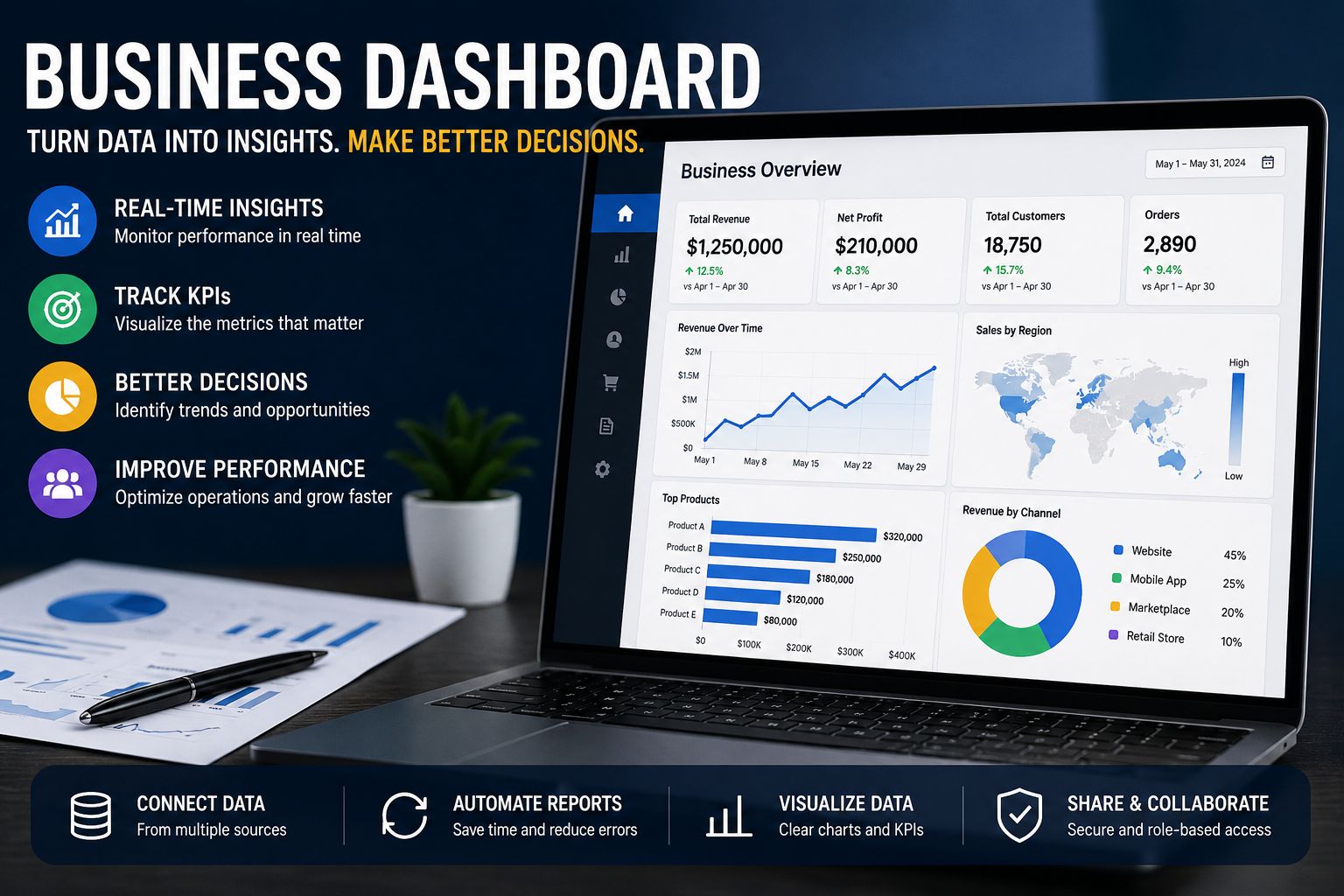
Many businesses collect data every day from sales platforms, accounting tools, CRM systems, websites, spreadsheets, marketing channels, customer service tools, and operational systems. The challenge is not always lack of data. The bigger problem is that the data often sits in different places, making it difficult for managers, business owners, and teams to understand what is happening in real time.
A business dashboard solves this problem by bringing important KPIs, metrics, and trends into one clear visual view. Instead of waiting for manual reports or checking several files, teams can monitor performance, identify problems early, compare results, and make faster decisions using organized data.
However, a dashboard is only useful when it tracks the right metrics, uses clean data, and supports real business decisions. A visually attractive dashboard can still fail if it shows the wrong numbers. A simple dashboard with accurate KPIs can help a business improve sales, reduce reporting delays, control costs, and understand performance more clearly.
If your company needs a dashboard for sales, finance, marketing, operations, retail, executive reporting, or business intelligence, you can use this guide to understand the best structure, tools, metrics, pricing factors, and development process before requesting a project quote.
Request a Quote Now if you already know you need a business dashboard and want help turning your data into a clear reporting system.
What Is a Business Dashboard?
A business dashboard is a visual reporting tool that displays important business metrics, KPIs, and trends in one place. It helps managers, executives, business owners, and teams monitor performance, identify problems, compare results, and make faster decisions without searching through multiple spreadsheets or reports.
A business dashboard can show data such as revenue, sales performance, profit margin, cash flow, expenses, website traffic, campaign performance, customer growth, inventory, support tickets, employee productivity, and operational activity. The goal is to make business performance easier to understand at a glance.
A dashboard is different from a traditional report. A report usually explains information in detail, while a dashboard helps users monitor performance quickly and decide where action may be needed.
| Feature | Business Dashboard | Traditional Report |
|---|---|---|
| Main purpose | Monitor performance quickly | Explain information in detail |
| Format | Visual and interactive | Static or text-heavy |
| Update frequency | Real-time, daily, weekly, or monthly | Usually periodic |
| Best use | Tracking KPIs and trends | Reviewing detailed findings |
| Users | Executives, managers, and teams | Analysts, managers, and stakeholders |
| Decision value | Fast performance visibility | Deeper review and documentation |
A dashboard does not replace detailed analysis. Instead, it helps users see what is happening quickly. When the dashboard shows a problem, the business can then investigate the cause through deeper reporting or analysis.
Why Business Dashboards Matter
A business dashboard matters because it turns scattered data into clear performance visibility. Many companies still depend on manual reports, disconnected spreadsheets, and delayed updates. This creates confusion, slows decisions, and makes it harder for leaders to act at the right time.
A strong dashboard helps businesses reduce manual reporting, track KPIs in one place, identify problems early, improve accountability, compare performance across time periods, and create one clear view of business performance. It also helps teams stop guessing and start using measurable evidence when making decisions.
For example, a sales manager can use a dashboard to track monthly revenue, leads, conversion rate, average deal size, sales pipeline value, and target progress without waiting for a weekly report. If leads are increasing but conversions are falling, the manager can review the sales process immediately instead of discovering the issue weeks later.
A finance manager can also use a dashboard to monitor cash flow, unpaid invoices, expenses, and profit margin. If expenses rise while revenue remains flat, the business can respond before the issue affects profitability. This is why dashboards are valuable: they help companies move from delayed reporting to active performance management.
Business Dashboard Examples by Department
Business dashboard examples vary depending on the department, business model, and decision-making need. An executive dashboard will not look the same as a sales dashboard, and a retail business dashboard will track different metrics from a marketing dashboard.
| Business Dashboard Example | What It Tracks | Who Uses It |
|---|---|---|
| Executive business dashboard | Revenue, profit, growth, customer retention, department performance | CEOs, directors, senior managers |
| Sales business dashboard | Leads, deals, win rate, revenue, pipeline value, sales targets | Sales managers and sales teams |
| Financial business dashboard | Expenses, cash flow, profit margin, revenue growth, accounts receivable | Finance teams and business owners |
| Marketing business dashboard | Website traffic, leads, conversions, ad spend, campaign ROI | Marketing teams |
| Operational business dashboard | Orders, inventory, delivery time, process delays, productivity | Operations managers |
| Customer support dashboard | Ticket volume, response time, resolution time, customer satisfaction | Support teams |
| Retail business dashboard | Store sales, product performance, stock levels, returns, customer trends | Retail managers |
Executive Business Dashboard
An executive business dashboard gives senior leaders a high-level view of company performance. It usually includes revenue, profit, growth rate, customer retention, cash flow, department performance, and progress toward strategic goals.
Executives do not need every small operational detail. They need a clear business performance dashboard that shows whether the company is growing, whether costs are under control, and whether key departments are meeting targets. A good executive dashboard should make it easy to see the overall health of the business within a few minutes.
Sales Business Dashboard
A sales business dashboard tracks leads, opportunities, win rate, revenue, average deal size, sales pipeline value, follow-ups, and performance against targets. It helps sales managers understand where deals are moving, which products or services are selling, and where the sales process may be slowing down.
For example, a sales team may use a dashboard to compare leads generated this month with deals closed. If the pipeline is full but revenue is low, the issue may be poor conversion, slow follow-up, weak qualification, or pricing resistance. The dashboard does not only show numbers; it helps the team ask better questions.
Financial Business Dashboard
A financial business dashboard helps business owners and finance teams monitor cash flow, expenses, profit margin, revenue growth, accounts receivable, unpaid invoices, and budget performance. This dashboard is useful because financial problems often appear gradually before they become serious.
For example, a company may still show strong sales but experience poor cash flow because customers are paying late. A financial dashboard can reveal the gap between billed revenue and collected cash, helping the business follow up on overdue payments and manage expenses more carefully.
Marketing Business Dashboard
A marketing business dashboard tracks website traffic, leads, conversions, ad spend, campaign ROI, email engagement, social media performance, cost per lead, and customer acquisition cost. It helps marketing teams understand which campaigns are generating useful results and which channels are wasting budget.
For example, a company may run campaigns across Google Ads, LinkedIn, email, and organic search. A dashboard can compare cost per lead, conversion rate, and revenue contribution across these channels. This helps the business move budget toward campaigns that produce qualified leads instead of focusing only on traffic.
Operational Business Dashboard
An operational business dashboard monitors day-to-day activity. It may track order volume, delivery time, inventory, process delays, production output, service requests, error rates, or workload. This type of dashboard is useful for managers who need to keep daily operations running smoothly.
For example, a logistics company may use an operational dashboard to track late deliveries, route delays, driver performance, and order completion. If delays increase in one location, the operations manager can investigate staffing, traffic, route planning, or warehouse processing time.
Retail Business Dashboard
A retail business dashboard helps physical stores, e-commerce businesses, and multi-location retailers monitor sales, products, stock, customers, and branch performance. Retail managers can use it to compare daily sales, product category performance, stockouts, returns, average order value, discount performance, gross margin, and customer retention.
A retail dashboard can reveal fast-moving products, slow-moving stock, underperforming branches, seasonal demand, and customer buying patterns. For example, if one store has high sales but low profit margin, the dashboard may show that excessive discounts are reducing profitability. If another branch has low sales and high stockouts, the issue may be inventory planning rather than customer demand.
Need a dashboard for your department or industry? Request a Quote Now and share your reporting goals.
Small Business Dashboard: What Should Small Businesses Track?
A small business dashboard does not need to be complicated. Small businesses need dashboards that show the numbers that directly affect sales, cash flow, customers, and daily operations. The best dashboard for a small business is usually simple, practical, and easy to update.
A small business owner may want to check revenue, expenses, unpaid invoices, leads, website traffic, and customer activity every week. This helps the owner know whether the business is growing, whether cash flow is healthy, and whether marketing efforts are producing real opportunities.
Useful small business dashboard metrics include monthly revenue, total expenses, profit margin, cash flow, leads, conversion rate, unpaid invoices, website traffic, repeat customers, inventory, customer acquisition cost, and average order value.
| Small Business Goal | Useful Dashboard Metrics |
|---|---|
| Increase sales | Leads, conversion rate, revenue, average order value |
| Improve cash flow | Income, expenses, unpaid invoices, profit margin |
| Improve marketing | Traffic, leads, cost per lead, campaign ROI |
| Manage operations | Inventory, orders, delivery time, process delays |
| Retain customers | Repeat purchases, churn, customer satisfaction |
Small business dashboard software may include Excel, Google Sheets, Looker Studio, Power BI, or simple custom dashboards. Excel and Google Sheets may work well for simple reporting. Looker Studio can be useful for web and marketing dashboards. Power BI may be better when the business needs interactive reporting, automated refreshes, and stronger data modeling.
The most important point is that small businesses should not copy complicated enterprise dashboards. They should start with a few important metrics, make sure the data is accurate, and improve the dashboard as reporting needs grow.
Business Dashboard Software Options
Business dashboard software helps companies create visual reports, connect data sources, automate updates, and share performance insights with teams. The right tool depends on the company’s size, data sources, budget, reporting frequency, automation needs, dashboard complexity, security requirements, and user skill level.
There is no single best software for every business. A small company that needs a simple monthly report may not need a complex BI platform. A growing company with data from sales, finance, marketing, and operations may need a more advanced dashboard tool that connects multiple systems.
| Business Dashboard Software | Best For | Notes |
|---|---|---|
| Power BI | Interactive business reporting and Microsoft-based companies | Strong for dashboards, data models, and automated refreshes |
| Tableau | Advanced visual analytics | Good for teams that need strong visual exploration |
| Looker Studio | Marketing and web analytics dashboards | Useful for Google Analytics, ads, and website reporting |
| Excel | Simple dashboards and spreadsheet reporting | Good for small teams and familiar workflows |
| Google Sheets | Collaborative lightweight reporting | Useful for simple shared dashboards |
| Zoho Analytics | Business reporting across Zoho tools | Useful for companies already using Zoho |
| Qlik | Guided analytics and enterprise reporting | Suitable for advanced analytics environments |
| Custom dashboard | Unique business workflows | Best when standard tools cannot meet reporting needs |
Choose Excel or Google Sheets if your reporting is simple, your data volume is small, and your team already works comfortably with spreadsheets. Choose Looker Studio if most of your reporting involves website traffic, Google Analytics, ads, and marketing channels. Choose Power BI if your business uses Microsoft tools, needs automated refreshes, or wants interactive reports connected to several data sources.
Tableau may be suitable for teams that need advanced visual exploration and flexible data storytelling. A custom dashboard may be better when the business has unique workflows, user permissions, client portals, or reporting requirements that standard tools cannot handle well.
Power BI Business Dashboard
A Power BI business dashboard is useful for companies that need interactive reporting, automated refreshes, filters, drill-downs, and connections to multiple data sources. It is especially helpful for businesses that already use Microsoft Excel, Microsoft 365, SQL databases, SharePoint, Teams, or other Microsoft tools.
Power BI can connect to Excel files, SQL databases, CRM systems, accounting systems, cloud platforms, marketing data, and operational systems. This makes it useful for businesses that want to combine information from different departments into one dashboard.
A Power BI dashboard may be too advanced for a very small business that only needs a simple monthly spreadsheet report. However, it becomes valuable when reporting is frequent, data comes from several sources, or managers need interactive views by region, product, customer segment, branch, or time period.
For companies that want Microsoft-based reporting, Dashboard Development Services can support KPI planning, data modeling, dashboard design, and interactive report development.
Business Dashboard Templates
A business dashboard template can help companies start quickly. Templates provide a ready-made structure for organizing KPIs, charts, filters, and performance summaries. They are useful when a business wants a faster starting point instead of designing every section from scratch.
Common business dashboard templates include executive dashboard templates, sales dashboard templates, finance dashboard templates, marketing dashboard templates, operations dashboard templates, retail dashboard templates, and small business dashboard templates.
A strong business dashboard template should include clear KPIs, a simple layout, relevant charts, filters, comparison periods, trend indicators, clear labels, and space for interpretation. It should also make the most important numbers easy to see without forcing the user to study the page for too long.
However, business dashboard templates should not be copied blindly. A generic template may look professional but still fail if it tracks the wrong metrics. For example, a sales dashboard template designed for a software company may not work well for a retail store. A finance template for a large company may be too complex for a small business.
The best approach is to use templates as a starting point, then customize them based on business goals, available data, user roles, and reporting frequency.
Business Dashboard Solutions vs Business Dashboard Software
Business dashboard software and business dashboard solutions are related, but they are not the same. Software is the tool used to create dashboards. A dashboard solution includes the full process of defining business goals, choosing KPIs, cleaning data, connecting systems, designing visuals, automating updates, and helping users interpret the results.
A business may own dashboard software but still struggle to build useful dashboards. This usually happens when the company has unclear KPIs, messy data, disconnected systems, or no clear reporting structure.
| Area | Business Dashboard Software | Business Dashboard Solution |
|---|---|---|
| Meaning | A tool used to create dashboards | A complete reporting setup |
| Example | Power BI, Tableau, Excel, Looker Studio | KPI planning, data cleaning, dashboard design, automation |
| Main focus | Technology | Business decision-making |
| Best for | Teams that know what to build | Teams that need a complete dashboard process |
| Output | Dashboard file or report | Working reporting system |
A complete business dashboard solution is useful when a company knows it needs better reporting but does not know which metrics to track, how to prepare the data, how to connect systems, or how to design the dashboard for decision-making.
For businesses that need a complete reporting setup, Dashboard Development Services can help turn scattered data into a clear dashboard system.
Business Dashboard Development Process
Business dashboard development is the process of planning, designing, building, testing, and improving a dashboard. The process should start with business goals, not charts. A dashboard should answer important business questions, not just display attractive visuals.
A useful dashboard is built around the decisions it needs to support. Before choosing charts or colors, the business should ask what users need to know, what actions they need to take, and which metrics show whether performance is improving or declining.
Steps in Business Dashboard Development
- Define the business goal
- Identify the dashboard audience
- Choose the most important KPIs
- Review available data sources
- Clean and prepare the data
- Select the right dashboard software
- Design the dashboard layout
- Build charts, filters, and visuals
- Test the dashboard with users
- Review and improve it over time
Many dashboard projects fail because teams start with visuals before defining the business question. A dashboard should answer questions such as: Are sales improving? Which product is performing best? Are expenses increasing? Which marketing campaign is generating leads? Where are operations slowing down? Are customers returning or leaving?
Clean data is also critical. If the data contains duplicates, missing values, inconsistent labels, outdated records, or incorrect calculations, the dashboard may produce misleading results. When data quality is a problem, Data Cleaning Services can help prepare reliable datasets before dashboard creation.
How Much Does a Business Dashboard Project Cost?
Business dashboard pricing depends on the size of the project, the number of data sources, the dashboard tool, the level of automation, the number of pages or views, and the amount of data cleaning required. A simple Excel or Google Sheets dashboard usually costs less than a multi-source Power BI or custom dashboard with automated refreshes and advanced data modeling.
The best way to price a dashboard project is to look at the actual reporting need. A small business that wants one sales dashboard from a clean spreadsheet will have a different cost from a company that needs sales, finance, operations, and marketing dashboards connected to several systems.
| Project Type | Best For | Typical Scope |
|---|---|---|
| Basic business dashboard | Small businesses or simple reporting needs | One dataset, basic KPIs, simple charts, manual or light refresh |
| Standard business dashboard | Growing businesses with regular reporting | Multiple KPIs, filters, charts, comparison periods, cleaner layout |
| Advanced Power BI dashboard | Companies with multiple data sources | Data modeling, automated refreshes, drill-downs, interactive reports |
| Executive dashboard package | Leaders and management teams | High-level KPIs, department summaries, performance comparisons |
| Custom dashboard solution | Businesses with unique workflows | Custom layout, special data connections, automation, user-specific views |
Several factors can affect the final quote:
- Number of dashboards or report pages
- Number of data sources
- Data quality and cleaning requirements
- Dashboard software used
- Level of interactivity needed
- Automated refresh requirements
- Custom formulas or calculations
- User roles and access needs
- Timeline and urgency
- Training or documentation requirements
A business dashboard project should not be priced only by the number of charts. The real work often includes understanding the business goal, selecting the right KPIs, preparing data, building a reliable structure, testing the dashboard, and making sure users can interpret the results.
Request a Quote Now to get pricing based on your dashboard goals, data sources, preferred software, and reporting needs.
Data Analytics Business Dashboard
A data analytics business dashboard goes beyond displaying numbers. It helps users understand patterns, trends, comparisons, and business performance drivers. This type of dashboard is useful when businesses want to understand not only what happened, but also why it may have happened.
Examples of analytics-focused dashboard insights include revenue by customer segment, sales by region, churn by product plan, marketing ROI by campaign, profit margin by product category, operations delays by location, and customer lifetime value by acquisition source.
A data analytics dashboard can help a business compare performance across products, locations, teams, or customer groups. For example, if total revenue is increasing but profit margin is falling, the dashboard may help identify whether the issue is discounting, product mix, rising costs, or low-margin customers.
For deeper interpretation of business trends, Data Analysis Services can support performance analysis, reporting, and insight generation.
Business Intelligence Dashboard vs Business Dashboard
A business dashboard and a business intelligence dashboard are closely related, but they are not always the same. A business dashboard usually focuses on monitoring important metrics. A business intelligence dashboard often goes deeper by helping users explore patterns, compare segments, and understand performance drivers.
| Area | Business Dashboard | Business Intelligence Dashboard |
|---|---|---|
| Main focus | Tracking business metrics | Analyzing business performance |
| Use case | Monitoring KPIs | Finding trends, patterns, and insights |
| Data depth | Summary-level view | Deeper analysis |
| Users | Managers, teams, executives | Analysts, leaders, decision-makers |
| Example | Monthly sales performance dashboard | Revenue analysis by product, region, and customer segment |
A company may use a business dashboard for daily KPI tracking and a business intelligence dashboard for deeper strategic analysis. For example, a sales dashboard may show that revenue dropped this month. A BI dashboard may help explain whether the decline came from one region, one product line, fewer leads, lower conversion, or reduced average order value.
For broader reporting strategy, data modeling, and decision-focused reporting systems, Business Intelligence Services can support companies that need more advanced BI infrastructure.
Business Dashboard for Digital Signage
A business dashboard for digital signage is displayed on screens in offices, warehouses, retail stores, call centers, production floors, or control rooms. These dashboards are designed for quick visibility, not detailed analysis.
Examples include sales targets on office screens, warehouse order status, call center queue performance, production line performance, retail branch performance, and customer support ticket status.
A digital signage dashboard should use large numbers, clear labels, simple charts, and limited information. It should avoid small text, crowded tables, excessive filters, and too many metrics. People should understand the dashboard from a distance within a few seconds.
This type of dashboard works best when teams need shared awareness. For example, a warehouse team may monitor pending orders, completed orders, delayed shipments, and packing speed throughout the day. A support team may display open tickets, response time, and queue volume so that supervisors can respond quickly when workload increases.
Business Dashboard Metrics: What Should You Track?
The best business dashboard metrics depend on the goal, department, industry, and decision being made. A KPI dashboard for business should not include every available number. It should include metrics that help users understand performance and take action.
| Business Area | Useful Dashboard Metrics |
|---|---|
| Executive | Revenue, profit, growth rate, customer retention, cash flow |
| Sales | Leads, conversion rate, win rate, average deal size, pipeline value |
| Finance | Expenses, profit margin, accounts receivable, revenue growth |
| Marketing | Traffic, leads, cost per lead, conversion rate, campaign ROI |
| Operations | Delivery time, order volume, inventory, productivity, error rate |
| Customer service | Ticket volume, response time, resolution time, satisfaction score |
| Retail | Sales by store, product performance, stock levels, returns, margin |
A company dashboard should show metrics that match actual business priorities. For example, a growing online store may focus on traffic, conversion rate, average order value, customer acquisition cost, cart abandonment, repeat purchases, and inventory levels. A service business may focus on leads, booked calls, project revenue, client retention, delivery timelines, and customer satisfaction.
Tracking too many metrics can make a dashboard confusing. A good business performance dashboard focuses on the numbers that matter most and organizes them in a way that helps users understand what action to take next.
Business Dashboard Design Best Practices
A dashboard should be easy to read, focused, and connected to real decisions. Good design is not only about appearance. It is about clarity, usability, and decision support.
Use these best practices when designing a business dashboard:
- Start with the business question
- Choose only important KPIs
- Use simple charts
- Avoid clutter
- Group related metrics
- Include comparison periods
- Show trends over time
- Use filters carefully
- Define every metric clearly
- Keep the dashboard easy to scan
- Design for the actual user
- Use clean and accurate data
- Review the dashboard regularly
A beautiful dashboard is not useful if it does not help users decide what action to take. The most effective dashboards make performance easy to understand and help teams know what to do next.
For example, a dashboard that shows “revenue this month” is useful, but it becomes stronger when it also shows revenue compared with last month, revenue compared with target, and revenue by product or region. Context turns numbers into insight.
Common Business Dashboard Mistakes to Avoid
Many dashboards fail because they look good but do not support decision-making. Others fail because the data is unreliable, the layout is confusing, or the metrics do not match business goals.
Common dashboard mistakes include:
- Tracking too many KPIs
- Using poor-quality data
- Copying generic templates
- Building dashboards without a clear goal
- Using confusing visuals
- Ignoring the end user
- Failing to update the dashboard
- Mixing unrelated metrics
- Failing to define metrics clearly
- Relying on manual data entry for important reports
Another common mistake is building the dashboard around available data instead of business questions. A better approach is to start with the decision, then identify the data needed to support it.
For example, instead of asking, “What data do we have?” a sales team should ask, “Which metrics help us understand why revenue is increasing or decreasing?” This approach produces dashboards that are more useful, focused, and connected to action.
When Should a Business Move from Spreadsheets to Dashboards?
Spreadsheets are useful, especially for small teams. They are flexible, familiar, and easy to start with. However, spreadsheets become limiting when reporting becomes repetitive, slow, inconsistent, or error-prone.
A business may need a dashboard when reports take too long to prepare, teams use different numbers, data is spread across many files, leaders need regular updates, manual reporting causes errors, teams need visual KPI tracking, reports need automatic refreshes, or managers need one version of performance truth.
For example, a business may start by tracking sales in Excel. As the company grows, sales data may come from a CRM, invoices may come from accounting software, and marketing leads may come from web forms. At that point, manual spreadsheet reporting becomes slower and riskier. A dashboard can connect these sources and update performance views more efficiently.
Spreadsheet dashboards can still be useful for smaller reporting needs. For companies that want structured spreadsheet-based reporting, Excel Dashboard and Reporting Services can help organize Excel reports into clearer performance dashboards.
Business Dashboards for Large and Complex Data
Some companies need dashboards that handle large datasets, many data sources, or complex reporting requirements. These dashboards may pull data from CRMs, ERPs, databases, cloud systems, financial tools, operational platforms, and marketing systems.
When data volume grows, dashboard performance, data modeling, automation, and governance become more important. A dashboard that works well with a small spreadsheet may become slow or unreliable when connected to millions of rows, multiple systems, or frequent updates.
Large-data dashboards may require better data pipelines, database design, automated transformation, user permissions, and performance optimization. Without these structures, users may experience slow dashboards, inconsistent numbers, or unreliable reporting.
For companies working with large or complex datasets, Big Data Analytics Services can support scalable data processing, reporting, and analytics workflows.
Request a Quote for Your Business Dashboard Project
Every business dashboard project is different. Some companies need a simple dashboard from one spreadsheet. Others need a Power BI dashboard connected to multiple data sources, automated refreshes, department-level views, and executive summaries.
When you request a quote, DataScienceConsultingPro.com can review your project needs based on:
- Your business goals
- The dashboard type you need
- Your preferred software
- Your available data sources
- The number of dashboard pages
- The KPIs you want to track
- Data cleaning requirements
- Automation and refresh needs
- Reporting frequency
- Timeline and delivery expectations
This helps create a dashboard project plan that fits your actual reporting needs instead of giving you a generic package.
Request a Quote Now and share your dashboard goals, data sources, and preferred reporting tool.
Conclusion
A business dashboard helps companies track important metrics, monitor performance, identify problems, and make better decisions. It turns scattered data into a clear visual view that managers, teams, and executives can use every day.
The best dashboards are not just attractive. They are accurate, focused, easy to understand, and connected to real business goals. When a dashboard tracks the right KPIs and uses reliable data, it becomes a practical tool for improving performance, planning, reporting, and decision-making.
If your company wants a dashboard that gives clear answers instead of more reporting confusion, Request a Quote Now and start with a dashboard plan built around your goals.
FAQs
A business dashboard is a visual reporting tool that displays important business metrics, KPIs, and trends in one place. It helps teams monitor performance, compare results, identify problems, and make faster decisions without searching through multiple reports or spreadsheets.
A business dashboard should include clear KPIs, charts, trends, filters, comparison periods, and simple metric definitions. The exact content depends on the business goal, department, and users who will rely on the dashboard.
Common examples include executive dashboards, sales dashboards, financial dashboards, marketing dashboards, operational dashboards, customer support dashboards, and retail dashboards. Each dashboard tracks different metrics based on the decisions users need to make.
The best business dashboard software depends on budget, data sources, reporting needs, automation requirements, and user skill level. Common options include Power BI, Tableau, Looker Studio, Excel, Google Sheets, Zoho Analytics, Qlik, and custom dashboards.
A small business dashboard is a simple reporting dashboard that helps small companies track revenue, expenses, cash flow, leads, customers, inventory, and daily operations. It helps business owners see performance clearly without relying on scattered spreadsheets.
The cost of a business dashboard depends on the number of data sources, dashboard pages, KPIs, software used, automation needs, and data cleaning required. A simple spreadsheet dashboard usually costs less than an advanced Power BI or custom dashboard connected to multiple systems.
A business dashboard usually monitors KPIs and performance metrics. A business intelligence dashboard often supports deeper analysis by helping users explore trends, patterns, segments, and performance drivers.
Yes, a business dashboard template can be a useful starting point. However, it should be customized to match your business goals, KPIs, data sources, and users. A generic template may look good but still track the wrong metrics.
Update frequency depends on the use case. Sales and operations dashboards may update daily or in real time, while executive and financial dashboards may update weekly or monthly. The dashboard should update often enough to support timely decisions.
You can request a quote by sharing your dashboard goals, available data sources, preferred software, KPIs, number of dashboard pages, and reporting needs. This helps estimate the scope, timeline, and best dashboard approach for your business.
